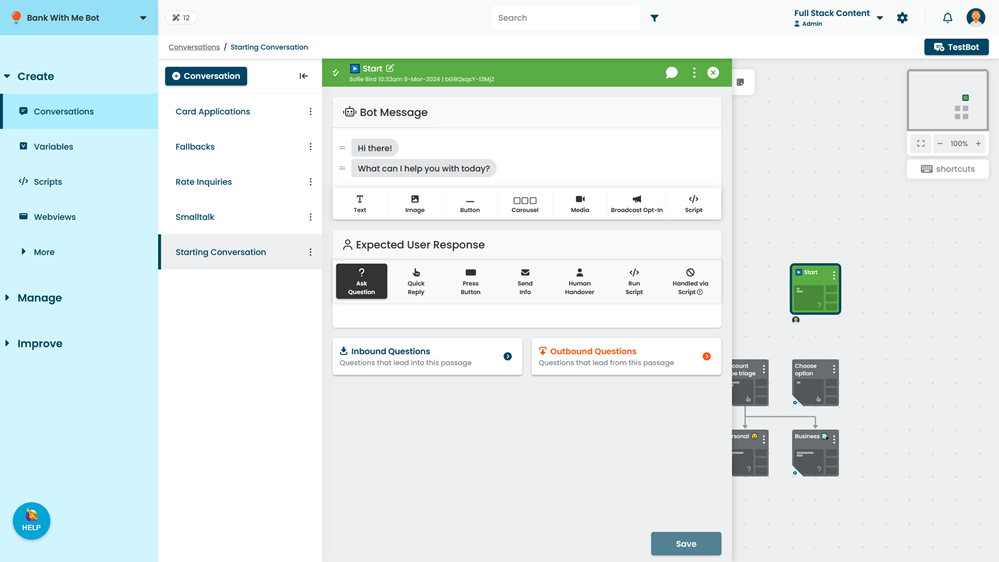
A passage is the building block of your chatbot. Each passage addresses a single question or need from the chatbot user. Use the passage edit screen to configure:
- What questions this passage answers.
- How the chatbot should respond, including triggering actions.
- What the chatbot user might say or do next.
Each passage consists of:
- A Name: a short title that describes the passage. This is not shown to your chatbot users.
- The Bot Message: content the chatbot sends to the chatbot user, including scripts that might be run.
- The Expected User Response: how the chatbot user is expected to respond.
This section can also run a script after the chatbot user has responded, or hand control of the chatbot over to a human. - Inbound Questions: typed responses from the chatbot user that should be answered by this passage.
- Outbound Questions: typed follow-up responses from the chatbot user after seeing this passage.
Passages also have a review state so you can control when changes appear in your live chatbot.
You can configure a passage to perform actions, like storing values to variables, adding or removing tags, setting user data, or scheduling notifications. Passage actions are triggered after conversation actions, but before the chatbot sends the first message bubble of the passage to the chatbot user.
You can also generate new message content for a passage, translate the content into another language, or annotate it for LLM models.
Designing conversation flows
Chatbot conversations feel most natural when the chatbot responds freely to the chatbot user's questions rather than the chatbot user having to navigate a structured path.
To create this free-flowing experience, try to design your passages as responses to questions:
- Create each passage as a response to a single question or request.
- Use inbound NLP questions to configure what question this passage answers.
- Use question context levels to control when a passage should match the question.
- Use child conversations where you need additional levels of context.
- Add outbound NLP questions if there are follow-up questions specific to this passage that you want to match differently.
- Use the Ask Question expected response where you can, so that the chatbot tries to match the chatbot user's next utterance to a passage.
You can also add logic to start different passages based on the value of a variable rather than creating a branching flow for the chatbot user to navigate.
If you do need to create a more structured flow, you can configure the chatbot to start a specific passage using:
- Buttons in button messages, media messages, and carousels.
- Quick Replies or the Send Info user response.
- Scripts in the bot message or the expected response.
If your chatbot user may jump out of your structured flow temporarily to ask a question, you can help them pick up where they left off using resumable conversations and passages.
Review states
You can see whether the passage is in draft, under review, ready for publishing or published by the icon next to the passage name, as well as who last edited the passage, and when.
You can also: