You can translate the text content of a passage into another language. All text in the bot messages and expected user reply such as Quick Replies are translated. The translation replaces the original content, and any entities, constants, and variables used in the original content are deleted.
You can also translate the training phrases.
Passage copy translations are created using a generative AI model connected to your chatbot. You will need:
- A translate copy usage with a configured translate text task and compatible connector.
- The languages you want to translate into listed in your NLP settings.
For more information on using multiple languages, see Multilingual chatbots.
To translate passage copy:
- Click Create in the left navigation, then click Conversations.
- Click the conversation with the passage you want to translate.
-
Click the passage you want to translate, then click the passage menu.
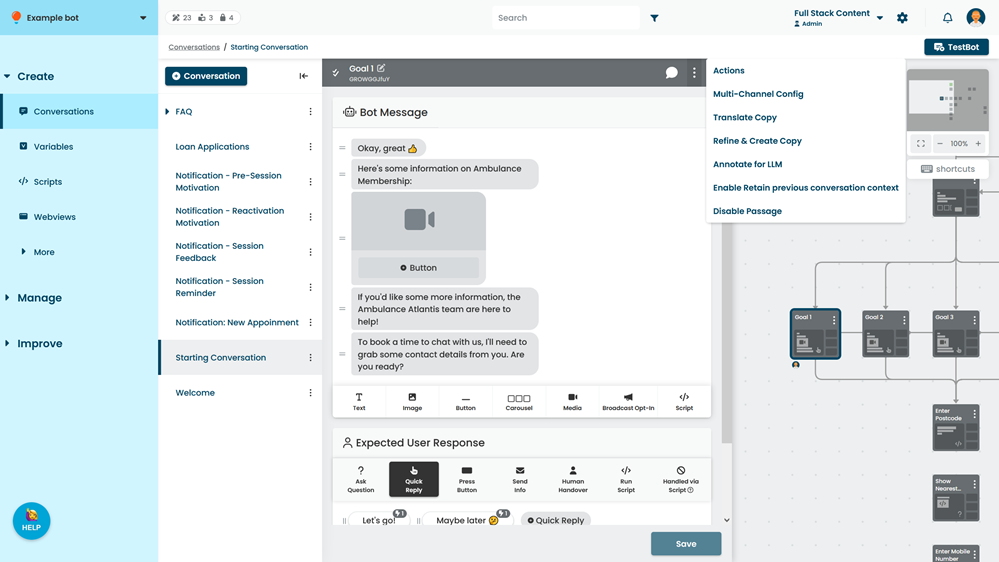
- Click Translate Content.
- Select the language you want to translate to.
Only languages listed in your NLP settings are available. - Click Translate.
- Review the translated content and make any adjustments you need.
- Click Save.