Create a chatbot to interact with chatbot users using content you create. You can create as many chatbots as you need.
You need an administrator role in your team to create a chatbot.
Each chatbot has a timezone and some pre-created passages that are used as default fallbacks for repeated responses, unexpected long text responses or attachments, unsupported messages, or unexpected interactions from new users. These are configured in your chatbot's Fallbacks settings. You can edit these passages or create your own. You can also create a duplicate of a published chatbot.
Why do I need a timezone?
Some chatbot features are time-sensitive, such as when you divert chatbot users away from your livechat agents outside your business hours. The chatbot uses its default timezone to know the current time when using time-sensitive features.
You can change the chatbot name and timezone later in the Chatbot settings.
Chatbots must be published before chatbot users can interact with them.
To create a chatbot:
- Click the chatbot menu in the left navigation, then click Create Chatbot.
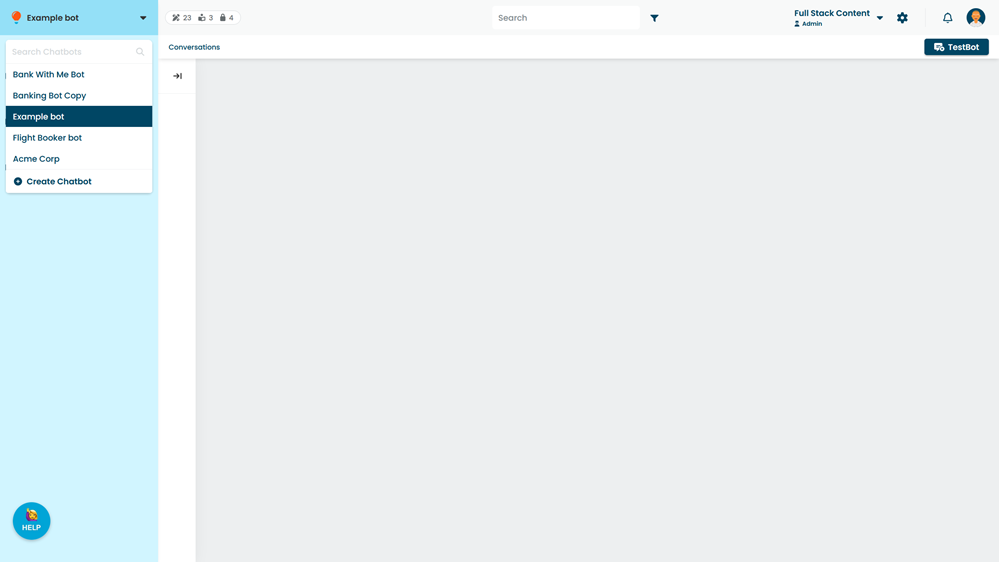
- Type a Name for your new chatbot.
- Select your chatbot's Default Timezone.
- Click Create.