In the inGenious AI platform, you build chatbots with a team. Every user in a team is assigned a role that determines what they're permitted to do.
A user can belong to multiple teams, but their role might be different in each team they're a member of. Someone who has an administrator role in one team doesn't get any special privileges in other teams.
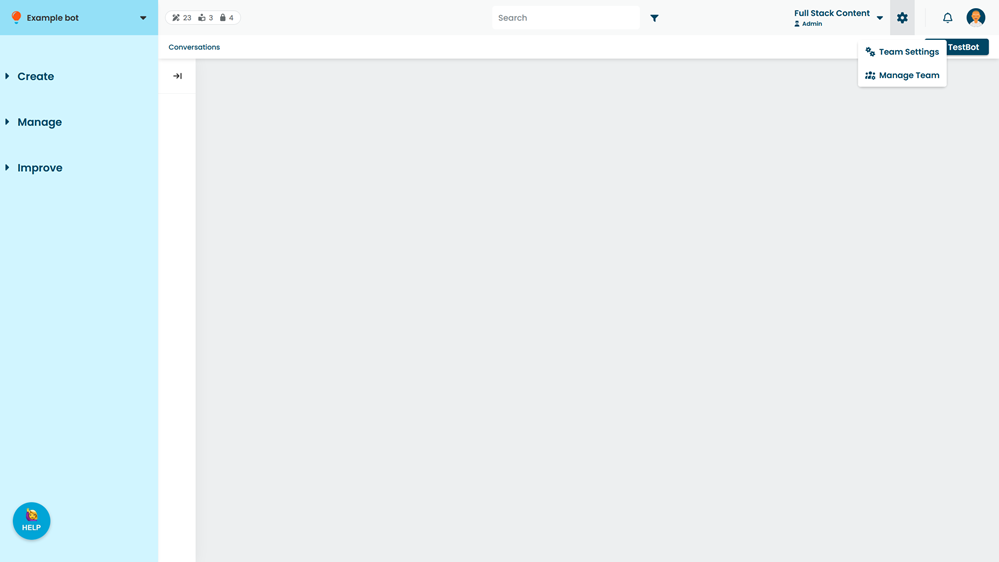
Manage your team using the Members screen, available from the gear icon next to your team menu. You will only see this menu in teams where you have an administrator role. Administrators can:
Roles and permissions
Each role within the inGenious AI platform has a different level of access to your chatbots and team. At a glance:
- Reviewers can view chatbots, content, settings and versions, but can't make changes.
- Editors can make changes to chatbot content, mark passages in chatbot response reviews, edit knowledge base and data store content and progress changes through versions, but can't publish content, create new chatbots, reviews, or generative AI tasks or connectors, or edit chatbot settings.
- Publishers can do everything editors can do, as well as publish chatbots, edit some chatbot settings, create and finalise reviews, create transcript and insight reports, and create generative AI usages, automated tests and guardrails, but can't create integrations or make team modifications.
- Admins can create and edit all chatbot content, settings, and features, as well as make team modifications.
For a more detailed view, see the roles and permissions tables for the following sections below:
- Teams, Users and Administration
- Chatbots and settings
- Chatbot content
- Chatbot broadcasts and audiences
- Chatbot versions and publishing
- Reviews and improvement
- Generative AI features
- Data stores and knowledge bases
Teams, Users and Administration
| Reviewer | Editor | Publisher | Admin | |
|---|---|---|---|---|
| Edit their own profile | ✓ | ✓ | ✓ | ✓ |
| View their list of teams | ✓ | ✓ | ✓ | ✓ |
| Create and manage teams | - | - | - | ✓ |
| View list of team members | - | - | - | ✓ |
| Add, manage and delete team members | - | - | - | ✓ |
| Assign user roles | - | - | - | ✓ |
Chatbots and settings
| Reviewer | Editor | Publisher | Admin | |
|---|---|---|---|---|
| View a list of chatbots | ✓ | ✓ | ✓ | ✓ |
| Create a chatbot | - | - | - | ✓ |
| View chatbot settings | ✓ | ✓ | ✓ | ✓ |
| Edit chatbot Business Hours | - | - | ✓ | ✓ |
| Edit chatbot Experience settings | - | - | ✓ | ✓ |
| Edit chatbot Fallback settings | - | - | ✓ | ✓ |
| Edit all other chatbot settings | - | - | - | ✓ |
| Manage integrations | - | - | - | ✓ |
| Archive chatbot | - | - | - | ✓ |
Chatbot content
Chatbot content includes conversations, passages, questions, notifications, scripts and webviews. Permissions for broadcasts and audiences and for reviewing chatbot content are listed separately below.
| Reviewer | Editor | Publisher | Admin | |
|---|---|---|---|---|
| View chatbot content | ✓ | ✓ | ✓ | ✓ |
| Create and edit chatbot content | - | ✓ | ✓ | ✓ |
| Delete chatbot content | - | ✓ | ✓ | ✓ |
| View sent notifications | - | ✓ | ✓ | ✓ |
| Test content with TestBot | - | ✓ | ✓ | ✓ |
Chatbot broadcasts and audiences
| Reviewer | Editor | Publisher | Admin | |
|---|---|---|---|---|
| View broadcasts | ✓ | ✓ | ✓ | ✓ |
| Create and edit broadcasts | - | ✓ | ✓ | ✓ |
| Duplicate broadcasts | - | ✓ | ✓ | ✓ |
| Publish broadcasts | - | - | ✓ | ✓ |
| Delete broadcasts | - | ✓ | ✓ | ✓ |
| Create an audience segment | - | - | ✓ | ✓ |
| Edit an audience segment | - | - | ✓ | ✓ |
| Delete an audience segment | - | - | ✓ | ✓ |
See Broadcasts for more information
Chatbot versions and publishing
| Reviewer | Editor | Publisher | Admin | |
|---|---|---|---|---|
| View chatbot versions | ✓ | ✓ | ✓ | ✓ |
| Save chatbot content as draft | - | ✓ | ✓ | ✓ |
| Save or approve chatbot content as ready to review | - | ✓ | ✓ | ✓ |
| Save or approve chatbot content as ready to publish | - | - | ✓ | ✓ |
| Publish a chatbot version | - | - | ✓ | ✓ |
See Versions for more information.
Reviews and improvement
| Reviewer | Editor | Publisher | Admin | |
|---|---|---|---|---|
| View reviews | ✓ | ✓ | ✓ | ✓ |
| Create a new review | - | - | ✓ | ✓ |
| Mark review phrases | - | ✓ | ✓ | ✓ |
| Finalise a review | - | - | ✓ | ✓ |
| Delete a review | - | - | ✓ | ✓ |
| Create and edit regression tests | - | - | ✓ | ✓ |
| Run regression tests | - | - | ✓ | ✓ |
| Delete regression tests | - | - | ✓ | ✓ |
| View transcripts from transcript or insight reports | ✓ | ✓ | ✓ | ✓ |
| Refresh transcript and insight reports | ✓ | ✓ | ✓ | ✓ |
| Create a private transcript or insight report | - | - | ✓ | ✓ |
| Share a private transcript or insight report | - | - | ✓ | ✓ |
| Make a private copy of a shared transcript or insight report | - | - | ✓ | ✓ |
| Edit a transcript or insight report | - | - | ✓ | ✓ |
| Delete a transcript or insight report | - | - | ✓ | ✓ |
See Reviews, Regression tests, Transcript reports and Insight reports for more information.
Generative AI
| Reviewer | Editor | Publisher | Admin | |
|---|---|---|---|---|
| Use platform-scope generative AI features | - | ✓ | ✓ | ✓ |
| Create a usage | - | - | ✓ | ✓ |
| Edit a usage | - | - | ✓ | ✓ |
| Edit a usage prompt | - | - | ✓ | ✓ |
| Edit a passage-specific prompt | - | ✓ | ✓ | ✓ |
| Delete a usage | - | - | ✓ | ✓ |
| Create or delete a connector | - | - | - | ✓ |
| Create a guardrail | - | - | ✓ | ✓ |
| Edit a guardrail filter | - | - | ✓ | ✓ |
| Duplicate a guardrail | - | - | ✓ | ✓ |
| Delete a guardrail | - | - | ✓ | ✓ |
| Create an automated test | - | - | ✓ | ✓ |
| Edit an automated test | - | - | ✓ | ✓ |
| Run an automated test | - | - | ✓ | ✓ |
| Delete an automated test | - | - | ✓ | ✓ |
See Generative AI for more information.
Data stores and knowledge bases
| Reviewer | Editor | Publisher | Admin | |
|---|---|---|---|---|
| Create a knowledge base | - | ✓ | ✓ | ✓ |
| Sync a knowledge base or edit a sync schedule | - | ✓ | ✓ | ✓ |
| Delete a knowledge base | - | - | ✓ | ✓ |
| Create a data source | - | ✓ | ✓ | ✓ |
| Edit data source files or urls | - | ✓ | ✓ | ✓ |
| View a data source history | - | ✓ | ✓ | ✓ |
| Sync a data source | - | ✓ | ✓ | ✓ |
| Delete a data source | - | - | ✓ | ✓ |
| Create a data store | - | ✓ | ✓ | ✓ |
| Upload or download data store data | - | ✓ | ✓ | ✓ |
| Delete data store data | - | ✓ | ✓ | ✓ |
| Delete a data store | - | ✓ | ✓ | ✓ |
See Knowledge bases for more information.