Use a conversation annotation to provide LLM models with additional context when they analyse any passages in that conversation.
For example, you could add a summary of the questions handled by the passages in a conversation to help your relevancy check task determine if a matched NLP question is relevant. Annotations are never visible to your chatbot users.
A conversation annotation applies to all the passages in that conversation. Child conversations do not inherit annotations from their parent and must be annotated separately. Annotated conversations display an annotation icon next to their name.
If you want to provide more information for an specific passage, use a passage annotation. You can use both passage and conversation annotations together.
Annotations are only used by some LLM tasks, and only if you've configured the task to use them. Annotations appear in versions as a change to the conversation that you annotated. Those conversation changes must be published before the annotations can be used by your tasks. If you want to test your annotations before you publish them, you can:
- Run some sessions using TestBot.
- Add your new annotations to a CSV and run automated tests.
To add a conversation annotation:
- Click Create in the left navigation, then click Conversations.
- Click the menu next to the conversation you want to annotate, then click Annotate for LLM.
If the conversation already has an annotation, you can click the annotation icon instead.
If you don't see Annotate for LLM, make sure you've enabled at least one task that can use annotations.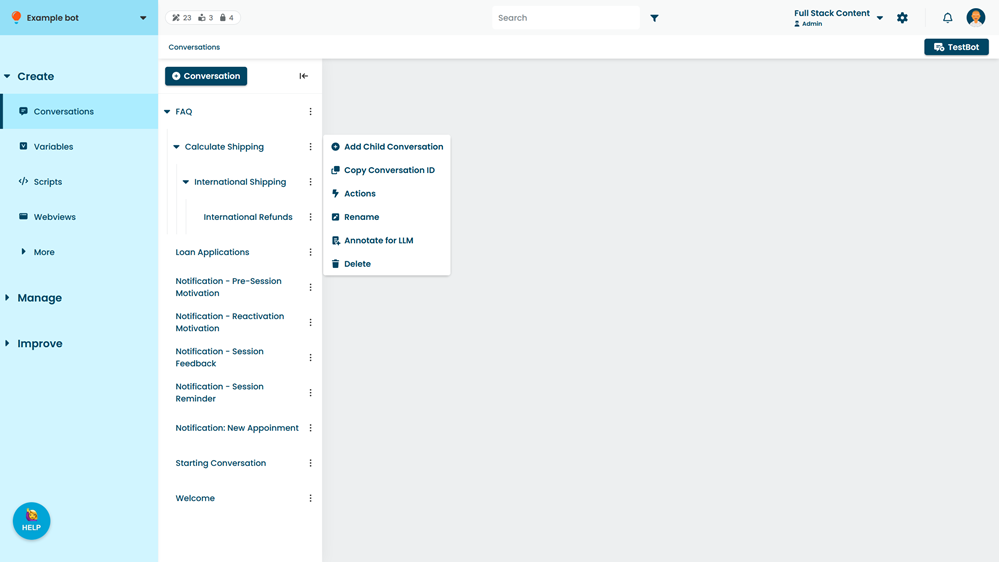
- Type your annotation.
- Click Save.