Create a review to mark how accurate your chatbot's responses were to your chatbot users during a period of time and prioritise updates to your chatbot content.
You can add filters to exclude specific questions that you don't want to review, such as questions for common chatbot utterances like "Are you a chatbot". If you want to review only a few specific conversations, passages, or logic, create a targeted review instead.
You need an administrator or publisher role on your team to create a review.
Create a review
To create a review:
- Click Improve in the left navigation, then click Reviews.
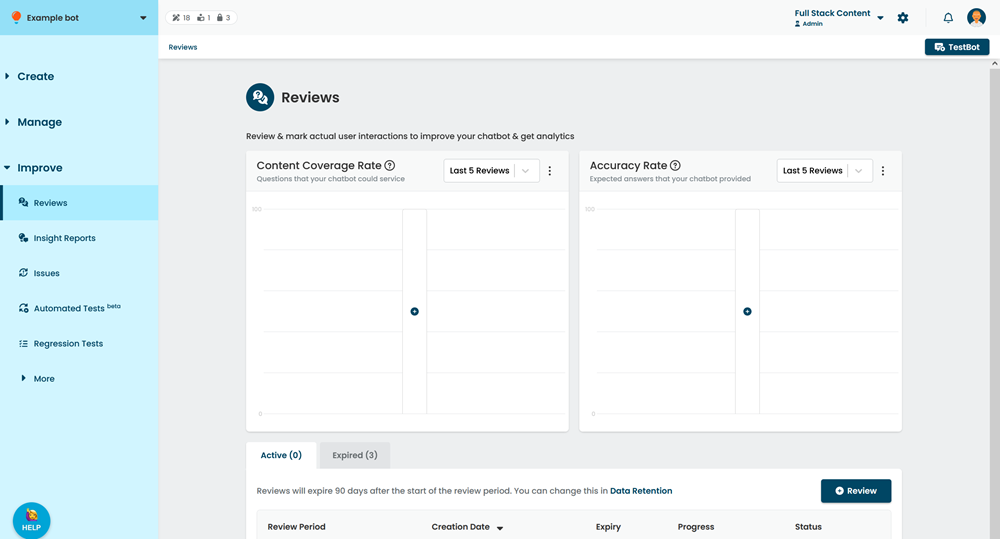
- Click + Review.
- Select the time period for your review.
The review includes all chatbot interactions that occurred between these dates, even if it belonged to a previous version of your chatbot. See Review period. - If you want to exclude questions from the review:
- Click + Filter.
- Select the Filter Type.
- Select the Question to exclude.
Any chatbot user interaction that triggered this question will not be included in the review.
- Click Create.
It takes a few minutes for all the data to be gathered. The inGenious AI platform will notify you when your review is ready to start marking.
Review period
Reviews gather all messages sent from a chatbot user to your chatbot over the specified period. By default, the period starts from the last published version of your chatbot, but you can select an earlier date, provided it doesn't overlap with a previous review.
If you start a review period before the latest version of your chatbot was published, the review will include passages and logic from the previous version, even if that content has been deleted in the more recent version, which may be confusing during the flow marking. The calendar displays when versions of your chatbot were published.