Once you have created a regression test, you can change its name and description or the threshold of correctly matched phrases the chatbot must meet to pass the test. You can also update the test cases the regression test uses:
- Overwrite the test cases it matches against by uploading a test case file.
- Generate more test cases based on chatbot content or variations of existing phrases.
- Manually add a test case with the +Test Case button.
- Edit the phrase or matched passage of a single test case.
You need an administrator or publisher role on your team to edit regression tests.
Regression tests can have a maximum of 1000 test cases. You can delete test cases if you no longer need to test those phrases:
- To delete a single test case, click the menu next to the test case, then click Delete.
- To delete all test cases in the regression test, click the menu at the top of the test case list, then click Delete all Test Cases.
You can also change the language the regression test uses to match your NLP questions. Changing the regression test language does not translate the existing test cases, so make sure you replace the existing test cases with new test cases in your chosen language.
When you save or run the regression test, the inGenious platform validates your test cases for issues such as passages in your test that have no global NLP questions, or passages that have more than one global NLP question. You must correct the issues before you can save or run the regression test.
Edit a regression test
To update a regression test:
- Click Improve in the left navigation, then click Regression Tests.
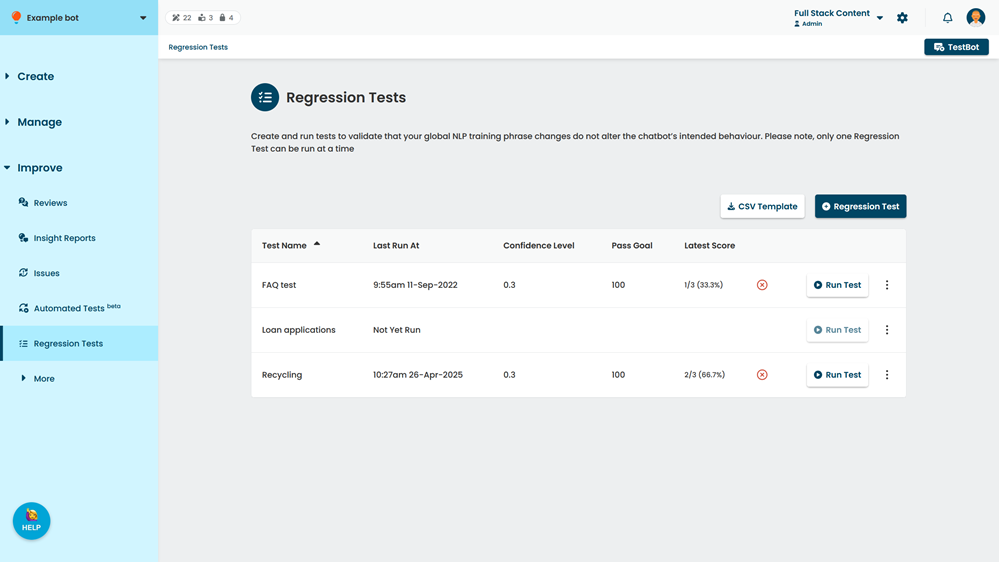
- Click the test you want to update.
- Make your changes.
- Click Save.