A test file contains phrases that are tested in a regression test and the passages they should match to. You upload this file to a regression test to replace the existing test cases with the new phrases and passage matches.
You need an administrator or publisher role on your team to upload test data into regression tests.
The test file is a comma-separated value (CSV) file: each line is a single test case with a phrase to test and the conversation and passage ID it should trigger in your chatbot, separated by commas. You can include up to 1000 phrases in one regression test or test file. If you need to test more than 1000 phrases, split the phrases into separate regression tests.
If you want to re-use test cases from an existing regression test, you can download the test file from a regression test.
If you want to create a file from scratch, you can download a template test case file to complete. To find all your conversation and passage IDs in one place, download the passages & questions file from your chatbot's general settings.
Upload a test case file to a regression test
Uploading a test case file to a regression test will overwrite any existing test cases.
- Click Improve in the left navigation, then click Regression Tests.
- Click the test you want to update.
- Expand the list of test cases.
-
Click the menu at the top of the test case list.
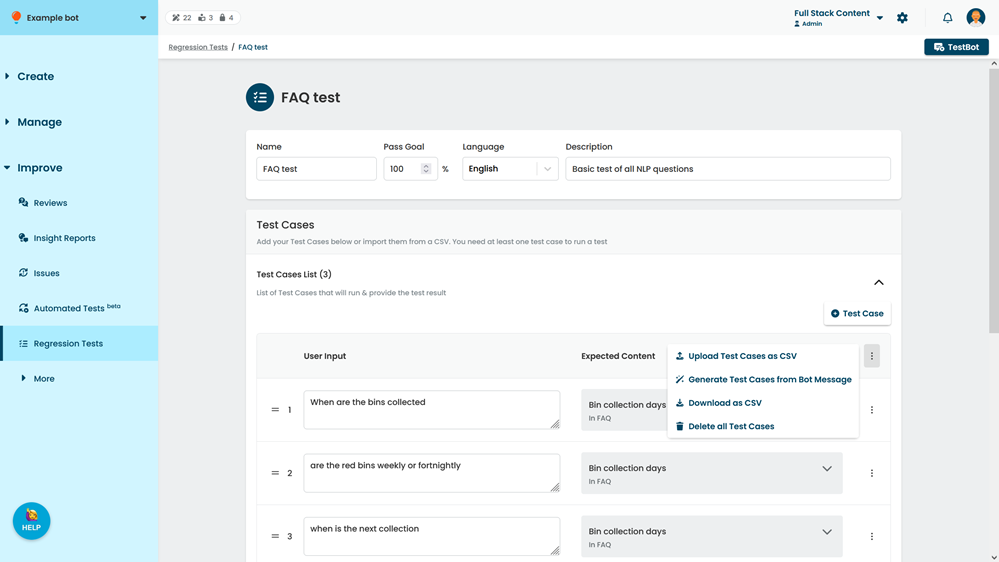
- Click Upload Test Cases as CSV.
- Select the test file CSV to upload.
- Click Upload.
The inGenious AI platform validates your test file for issues such as incorrect formatting, invalid conversation or passage IDs, passages with no global NLP questions, or passages with more than one global NLP question. - Click Save.
Download a test case file from a regression test
To download a test case file based on an existing regression test:
- Click Improve in the left navigation, then click Regression Tests.
- Click the test you want to download from.
- Expand the list of test cases.
-
Click the menu at the top of the test case list.
- Click Download as CSV.
Download the test case template file
To download the test case template file:
- Click Improve in the left navigation, then click Regression Tests.
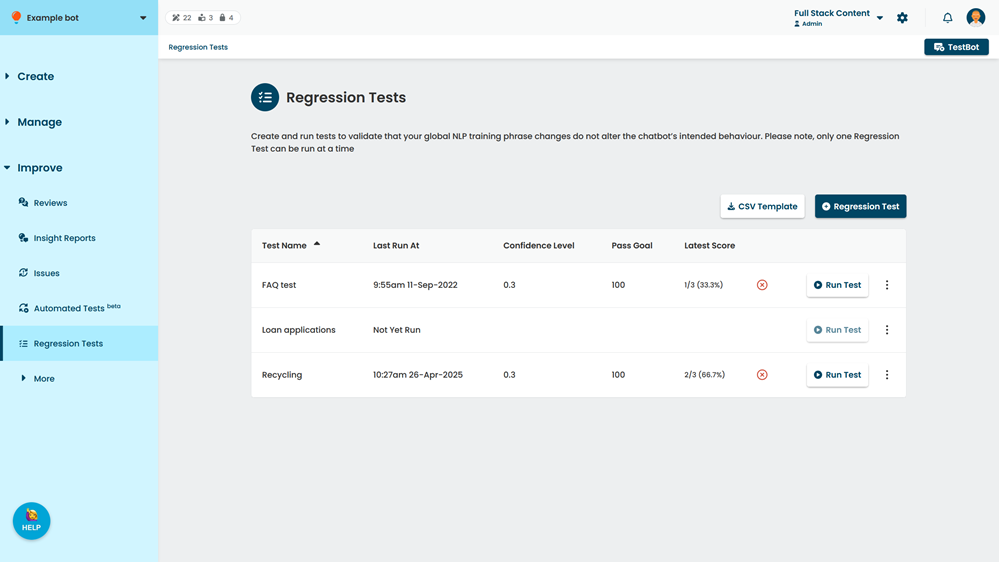
- Click CSV Template.
- Open the downloaded file and complete the template.
Make sure you use the template format and that your conversation and passage IDs are correct.