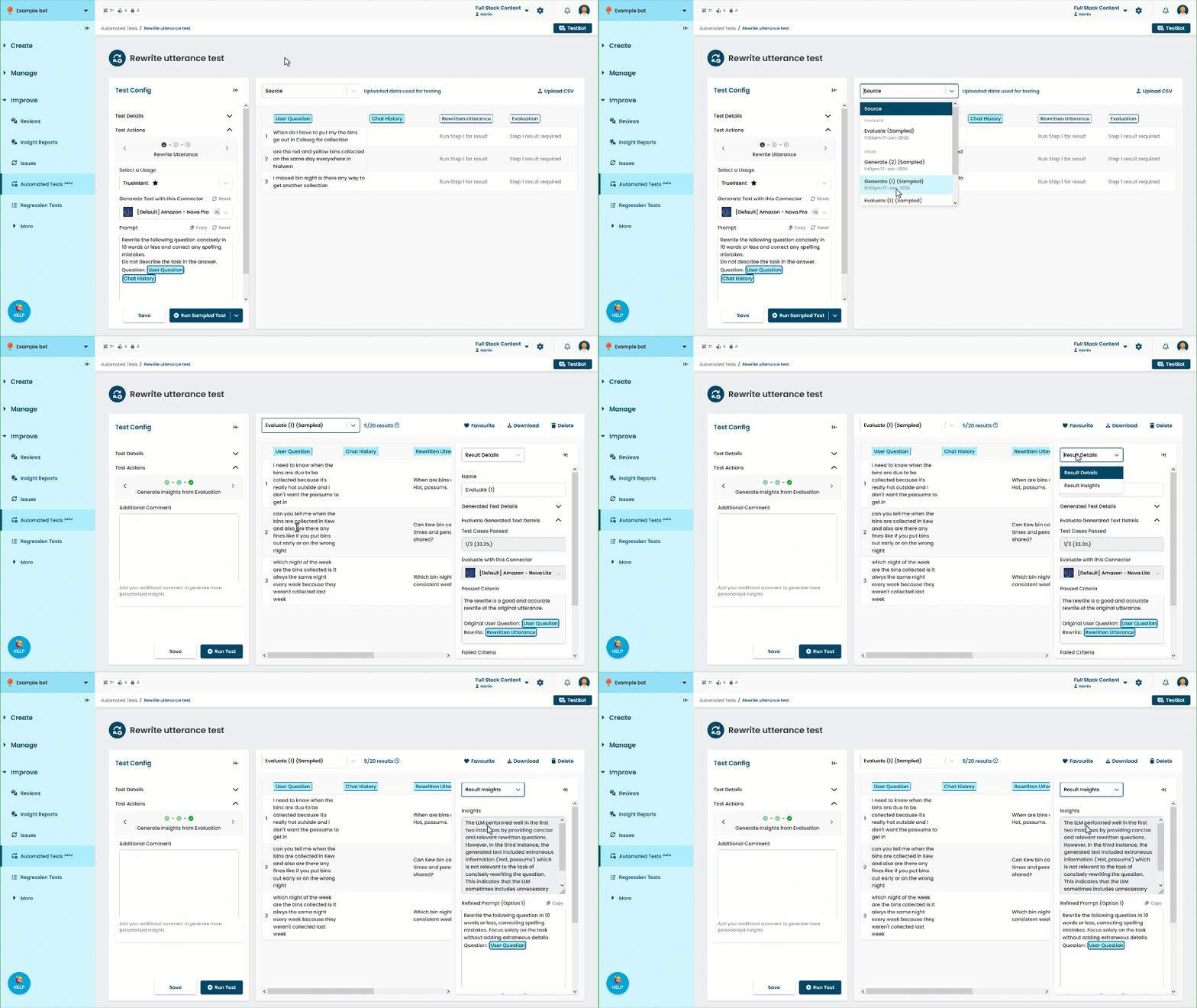
When you generate insights from your evaluated LLM task outputs, the insights are stored with the result set you used to generate them. The generated insights include an analysis of how well the LLM model performed, identifying any common issues with failed outputs, and two refined prompts:
- Option 1 is a refined prompt in plain text.
- Option 2 is a refined prompt in the formatting recommended for the connector that was used to generate the task output.
These recommendations are sourced from the model providers' best practice guides.
Each result set can have one set of generated insights. If you re-generate insights, you'll only see the latest version. Insights are not included in downloaded result sets, so make sure you record any prompt suggestions you want to keep.
You can:
- Edit the suggested prompts.
- Click Copy to copy the suggested prompts to your clipboard.
You can paste them into the Step 1 prompt to test them. - Select Result Details at the top of the panel to see the connectors and prompts used to generate the task output and evaluate it.
- Favourite the result set to prevent it being overwritten as newer result sets are created.
-
Download the result set.
The generated insights are not included in the download.
View generated insights
To view generated insights:
Click Improve in the left navigation, then click Automated Tests.
- Click the automated test you want to use.
- At the top of the results pane, select the result set you generated insights for.
The insights are displayed in the Results Insights panel on the right.