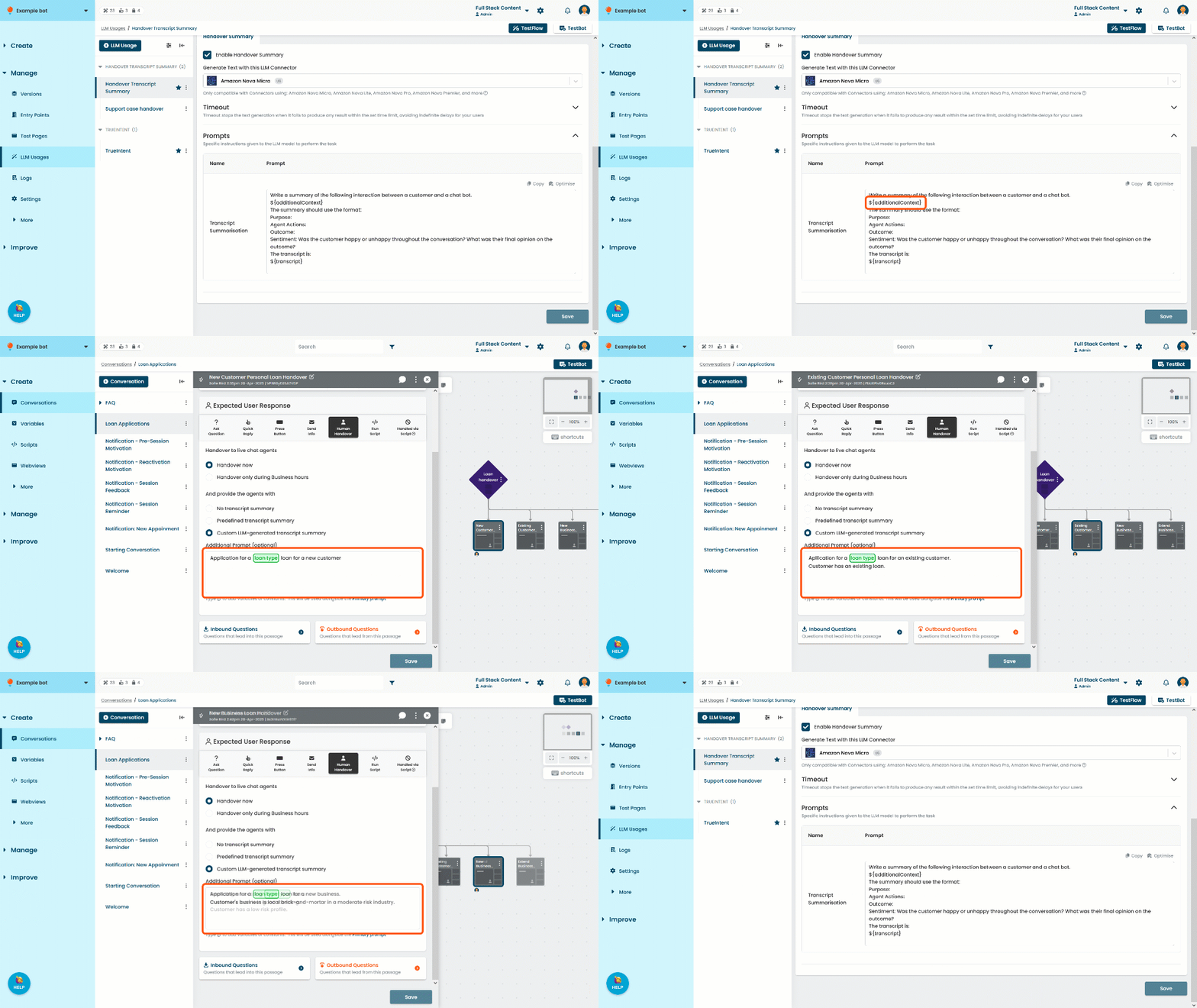
The handover transcript summary task provides your livechat agents with a generated summary of the chatbot user's conversation with the chatbot when they are handed over, so the livechat agent can quickly understand the situation and provide faster assistance. The generated summary will not be visible to your chatbot users.
You need an administrator or publisher role in your team to change a task prompt.
The task contains one prompt:
-
Transcript Summarisation generates a summary of a given transcript, optionally using any additional context supplied by the passage where the handover was triggered.
Prompt variables: ${transcript} and ${additionalContext}.
Check the top of the usage page to see if this is the primary usage and whether your changes must be published to take effect. If there is no note indicating your changes must be published, then the changes are applied immediately and will not appear in versions.
Changes to this prompt may indirectly impact your chatbot users' experience when they are handed over to live agents, so you should test your changes thoroughly before you publish. You can test your handover summaries by creating a passage that uses a human handover and testing in the Test Bot. Generated summaries are displayed in your test bot logs as LLM Generated Transcript Summary Sent: followed by the generated summary.
Prompt variables and requirements
The default prompt provides a suggested formatting. This formatting is designed to ensure the generated summary provides specific information such as a sentiment analysis and is in a consistent structure that the agent can easily read. You can change this formatting if you prefer.
Make sure you don't change or delete these prompt variables:
- ${additionalContext}: additional prompt context provided by the specific passage that triggered the handover. See Add passage context.
-
${transcript}: the chat transcript to summarise.
The ${transcript} variable should always be last in this prompt. Any instructions or information placed after the ${transcript} variable are likely to be ignored.
You don't need to provide values for these variables. The value for ${transcript} is automatically supplied from the chatbot user's conversation, and the optional value for ${additionalContext} is provided by passage-specific prompts.
Suggested customisations
The default prompt provides an organised structure for the output and requests additional information such as sentiment analysis. You may like to customise it to be more specific to your needs:
- Add instructions to use specific spelling, terminology, tone, or cultural ways of speaking.
- Add your organisation's context, such as a banking organisation or city council.
- Add instructions to ensure important keywords or themes are highlighted to the agent such as specific product names.
- Add instructions to remove identifiable or personal customer information such as their name or address.
Make sure you don't add information or instructions after the ${transcript} prompt variable.
Add passage context
Handover transcript summaries are generated when the chatbot starts a passage that uses a human handover expected response that is configured to generate a summary.
Each passage that uses a human handover response with a generated summary can provide additional information or instructions in the Additional Prompt field of the human handover configuration.
This information is added to the task prompt in the ${additionalContext} variable. This way, you can customise the prompt used for each passage. For example:
- Information about the type of conversation this passage belongs to.
For example, one passage may hand over users during a loan application while another hands over users who have reported financial hardship. - Constant values or variable values that may have been set during the conversation.
When adding additional prompts, you can click the link under the Additional Prompt field to see the primary task prompt as a reference.
If you want to use different additional prompts based on the chatbot user's situation, consider using logic to check variables that have been set during the conversation and direct the chatbot to different human handover passages. You can configure each passage with its own additional prompt.