So far, we've created a variable for the chatbot user's account type, and a passage in our welcome conversation that asks the chatbot user their account type and stores their response in the variable.
Before we can use this variable to direct the conversation flow, we need some passages to direct the conversation to. We'll create one passage to handle personal credit card applications and another to handle business credit card applications.
In each passage, we'll add an inbound question with training phrases that specifically mention the account type, so that if our chatbot user mentions the account type in their question, the chatbot will match the correct application passage without needing to check the chatbot user's account type.
Create a passage for personal credit cards
In your inGenious AI chatbot:
- Click Create in the left navigation, then click Conversations.
- Click the card applications conversation.
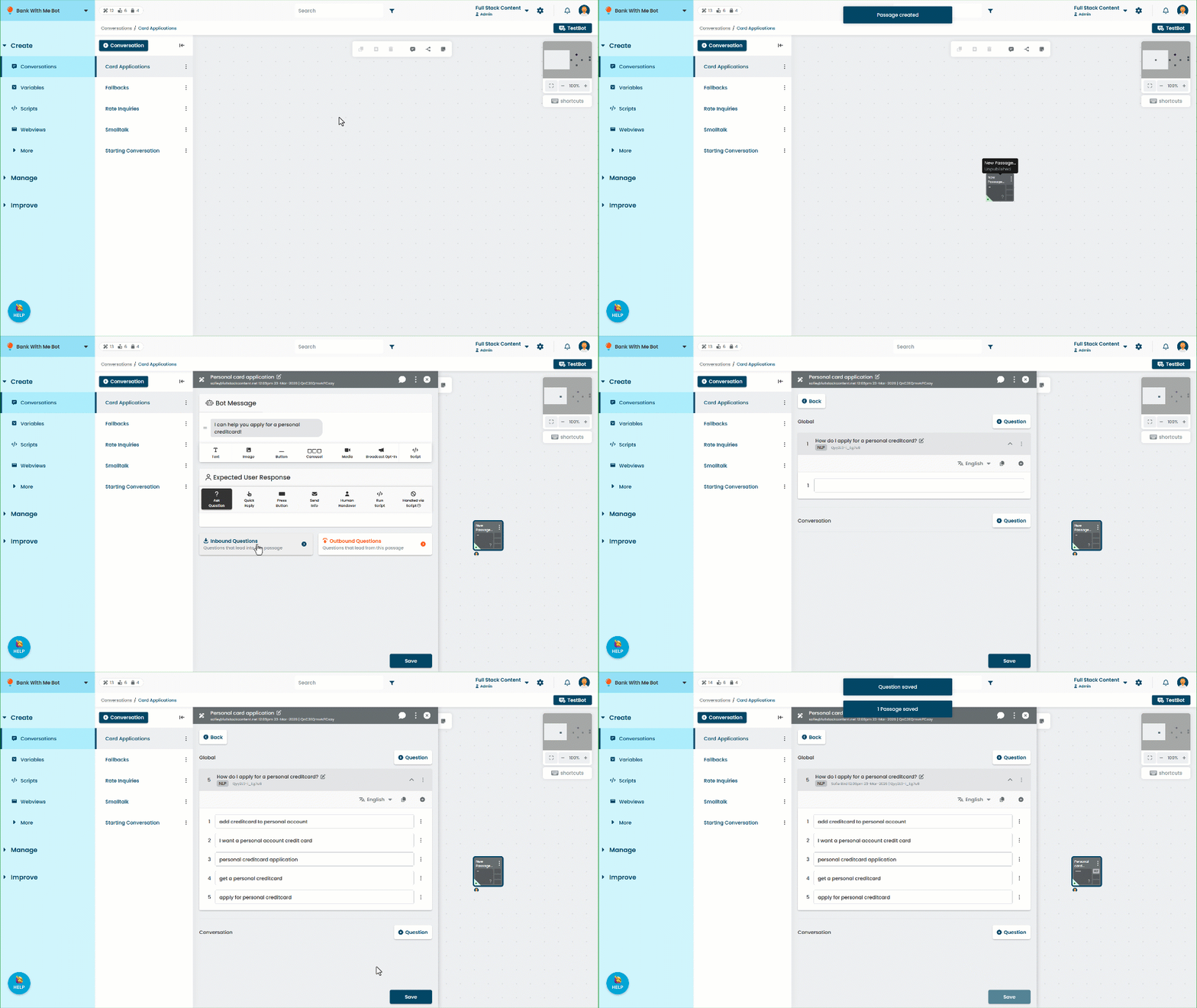
- Click the passage icon to create a new passage in the conversation.
- Rename the passage to Personal card application.
- Add a text message to the chatbot content: I can help you apply for a personal credit card!
- Click Inbound Questions.
- Add a new Global question: How do I apply for a personal credit card?
- Add at least five training phrases for personal credit card applications.
Make sure all the training phrases are specific to personal accounts. - Click Save.
Create a passage for business credit cards
Now we'll create the passage for the business card applications. In the card applications conversation:
- Click the passage icon to create another new passage in the conversation.
- Rename the passage to Business card application.
- Add a text message to the chatbot content: I can help you apply for a business credit card!
- Click Inbound Questions.
- Add a new Global question: How do I apply for a business credit card?
- Add at least five training phrases for business credit card applications.
Make sure all the training phrases are specific to business accounts. - Click Save.
Now that we have our variable and our passages, we can add logic to direct the conversation to the correct passage depending on the chatbot user's account type.