You can view and download the latest results of all your regression tests from the Regression tests page. For each regression test, you can view:
- The name of the test and the last time it was run.
- The confidence interval used to run the test.
This is the same confidence interval defined in your chatbot's NLP settings. - The pass goal defined in the regression test.
- How well the chatbot performed on that test run.
- The results of the last five test runs.
To view the test results:
- Click Improve in the left navigation, then click Regression Tests.
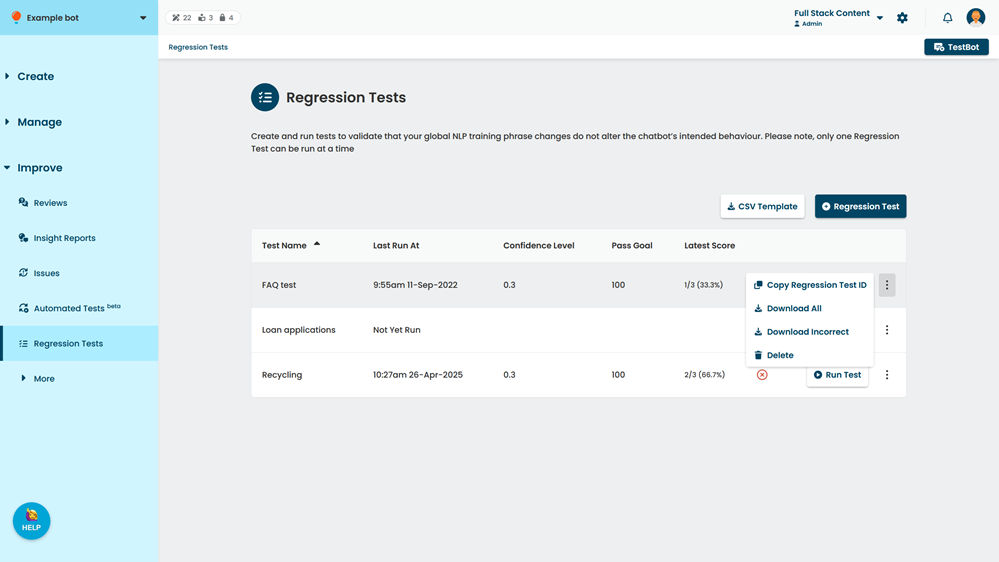
- Cick the test you want to view.
Download test results
The test results download shows each phrase with the conversation and passage it was supposed to match, and the conversation and passage the chatbot actually matched. If you have an adminiatrator or publisher role on your team, you can upload the incorrect results file as-is into a new regression test to create a test to target just those phrases.
To download the test results:
- Click Improve in the left navigation, then click Regression Tests.
- Cick the menu next to the test you want to download.
If you want to download results from a previous run of this test, click the test, then click the menu next to the run you want to download results from.
- Click either:
- Download all to download all results.
- Download incorrect to download results only for phrases the chatbot did not match.