Run a regression test to check that your chatbot's NLP questions are correctly matching the phrases you have defined in the test file. You can run a regression test as many times as you need, but you can only run one regression test at a time.
You need an administrator or publisher role on your team to run regression tests.
When you run a regression test, the inGenious platform validates your test cases for issues such as passages in your test that have no global NLP questions, or passages that have more than one global NLP question. You must correct the issues before you can run the regression test.
To run a regression test:
- Click Improve in the left navigation, then click Regression Tests.
- Cick Run Test next to the test you want to run.
If you need to create a new test, see Create a regression test.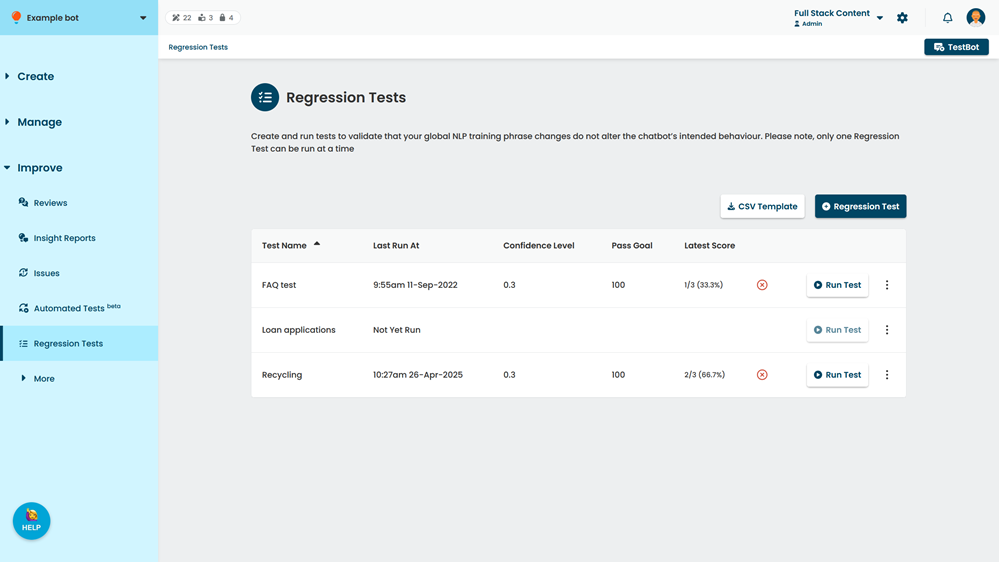
Tests can take up to twenty minutes to complete. The Run Test button displays Running while a test is running. Your results will update automatically on the page when the test is complete.