When the chatbot starts a passage, either from matching a question or following a button or script, the chatbot's conversation context changes to the passage's conversation. This ensures that any questions the chatbot user asks are checked against the most recent context, so the conversation feels more natural.
But sometimes you want to start passages from another conversation without switching the conversation context. For example, if a chatbot user says "thanks" in response to something your chatbot does, you want to say "you're welcome"and return seamlessly to the topic at hand, even if the "you're welcome" passage is located in a different conversation.
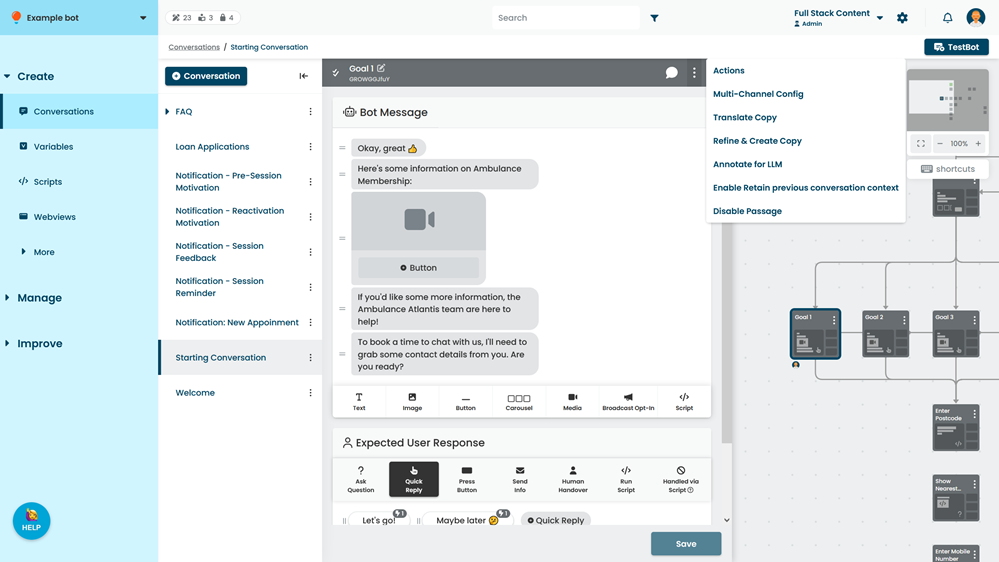
The Retain the previous conversation context option tells the chatbot to not switch the conversation context when it starts this passage. So if the chatbot user says "thanks" in the middle of a loan application flow, the chatbot answers with the "you're welcome" passage from the FAQ conversation, but doesn't switch the conversation context to the FAQ. The chatbot then resumes the loan application flow as if it had never left, creating a much more natural conversation.
Any conversation or passage actions you've configured will still be triggered when the chatbot starts the passage, even if the passage is set to retain the previous conversation context.
To prevent your chatbot users getting stuck in conversation loops from logic errors, logic always retains the previous conversation context.
You can set the Retain the previous conversation context option for multiple passages at once in your chatbot's Experience settings.
Retain previous conversation and locked-in conversations
When using locked-in conversations, the Retain previous conversation context setting can impact whether a chatbot user is locked into or released from a locked-in conversation:
- If the chatbot user is not locked in and is sent to a passage in a locked-in conversation that has Retain previous passage context enabled, the conversation context does not switch to the locked-in conversation, and the chatbot user is not locked in.
- If the chatbot user is locked in and is sent to a passage outside the locked-in conversation that has Retain previous conversation context enabled, the chatbot keeps the locked-in conversation as the conversation context, and the chatbot user is still locked in.
Retain previous conversation vs Resume Conversation
The Resume Previous Conversation Quick Reply feature provides a similar function of returning the chatbot user to a previous conversation, with two differences:
- Whether or not the conversation context changes.
- Whether or not the chatbot user is returned to the previous conversation automatically.
Retain previous conversation context:
- Does not change the conversation context.
- Returns the user automatically to the previous conversation.
This means any questions they ask are matched against the original conversation.
The Resume Quick Reply feature:
- Does change the conversation context.
- Does not return the chatbot user automatically to the previous conversation.
This means any questions the chatbot user asks after the passage will be matched against the conversation that the answering content is in ( that's the "you're welcome" passage in our example), and the chatbot user must explicitly ask to be returned to the previous conversation by tapping the Resume Quick Reply.
This can feel unnatural for things like a "you're welcome" response, but may provide a better experience for a chatbot user clarifying something.