The profanity filter detects offensive words such as swearing or curse words.
The list of words considered profane can't be customised and may be updated without notice. If you want to ensure specific words are always filtered, add them in the denied words filter.
The profanity filter can:
-
Flag and block content with profanity:
- If the filter is on an input guardrail, the chatbot does not send the content to the LLM model.
- If the filter is on an output guardrail, the chatbot discards the content it received from the LLM model.
Your script can start a passage designed to handle this type of content instead.
- Flag the content but allow the chatbot to continue normally.
You need an administrator or publisher role on your team to edit guardrail filters.
Changes that you make to profanity filters must be published before they take effect.
To filter profanity:
- Click Manage > More in the left navigation, then click Guardrails.
- Click the guardrail you want to modify or create one.
- In the Profanity tab, make sure Profane Words is enabled.
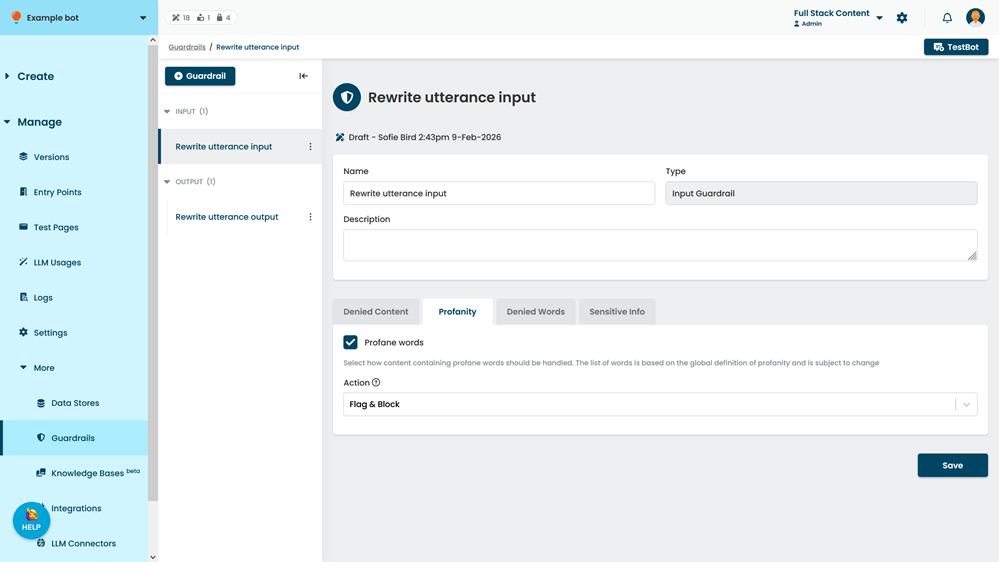
- Select the Action:
-
Flag & Block to respond to the content differently.
If this is an input guardrail, the LLM model will not receive the content. If this is an output guardrail, the chatbot will not receive the generated output. Your script can start a specific passage instead. - Flag Only to flag the content but allow the chatbot to continue normally.
- To stop filtering profane words, clear the Profane Words checkbox to disable the filter.
-
Flag & Block to respond to the content differently.
- Click Save.