Duplicate a guardrail to create a new input or output guardrail with the same filter configurations.
Only the filters that are supported by the new guardrail's type are included:
- If you duplicate an output guardrail as an input guardrail, the new input guardrail won't have context validation filters.
- If you duplicate an input guardrail as an output guardrail, the new output guardrail won't have a prompt attack category in the harmful content filter.
You need an administrator or publisher role on your team to duplicate guardrails, and your new guardrail must be published before you can use it.
To duplicate a guardrail:
- Click Manage > More in the left navigation, then click Guardrails.
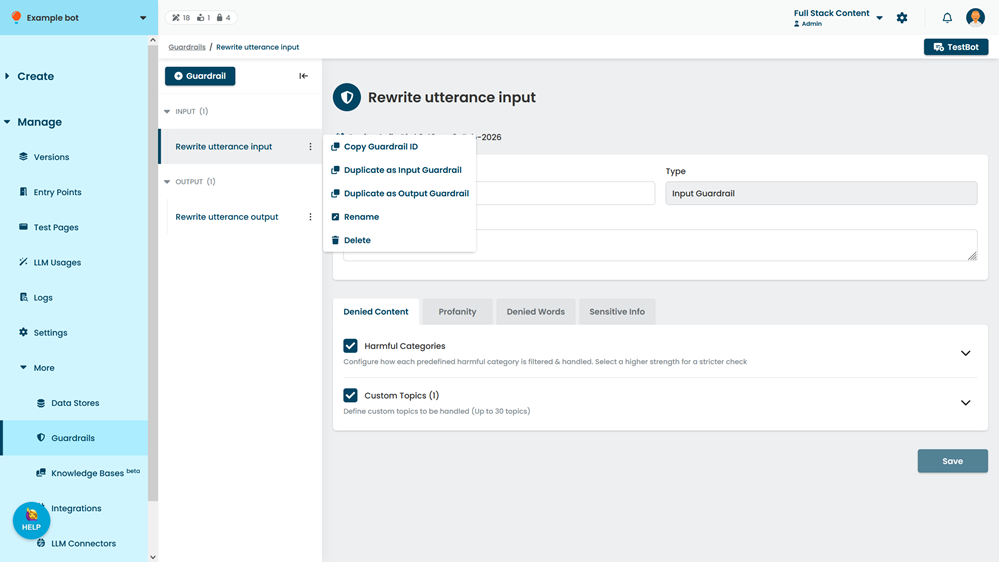
- Click the menu beside guardrail you want to duplicate, then click either:
- Duplicate as Input Guardrail.
- Duplicate as Output Guardrail.