Change which Large Language Model (LLM) a task uses by selecting a different connector for the task. You need an administrator or publisher role in your team to change a task model.
Check your prompts
Different models may provide very different output to the same prompt, even when the models are from the same provider. You may need to revise your prompt after changing the model. If you are changing the model for a chatbot task such as handover transcript summaries, make sure you thoroughly test the output.
When editing tasks and usages, check the top of the usage page to see if it is the primary usage and whether your changes must be published to take effect. If there is no message indicating your changes must be published, then the changes are applied immediately and will not appear in versions.
Make sure you thoroughly test any related content before you publish your changes.
To change the usage model:
- Click Manage in the left nativation, then click LLM Usages.
- If you don't see the usage you want to update, click the filter icon next to + LLM Usage and make sure Show Platform Usages is selected.
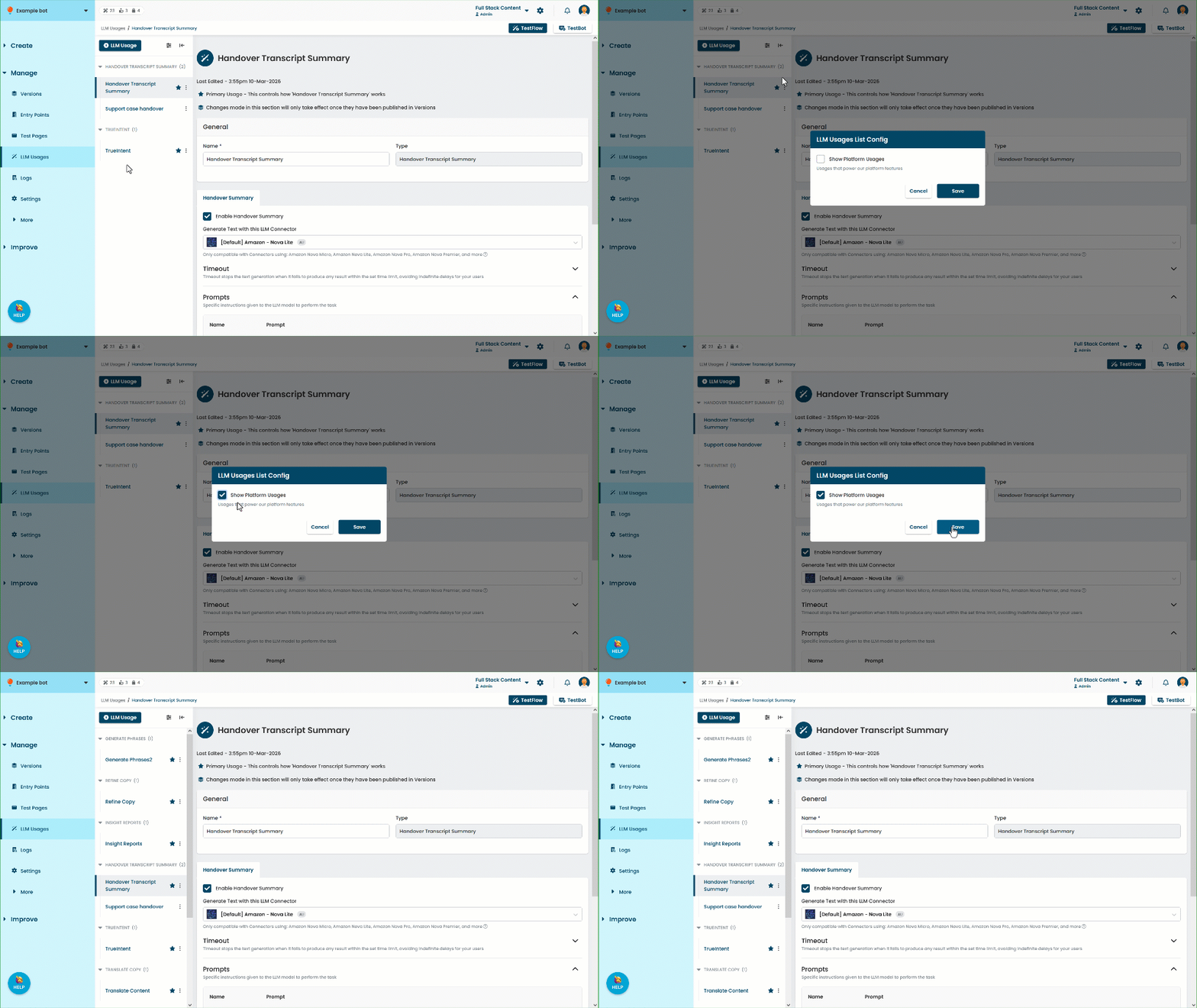
- Click the usage of the task you want to update.
- In the task tab, select the connector you want to use.
Only existing connectors which support the task are available. - Click Save.