If your users use several different words to mean the same entity value, such as 'rubbish' or 'trash' for 'waste', use synonyms to match them to the original entity value. This helps you keep your entity values more maintainable.
When adding synonyms to your entity, consider the values and synonyms you already have in other entities. Avoid adding a synonym that might conflict with another entity.
You can only create synonyms for values in custom entities. Template entity synonyms have already been defined for you.
To create a synonym for an entity value:
- Click Create > More in the left navigation, then click Entities.
- Click the entity you want to edit.
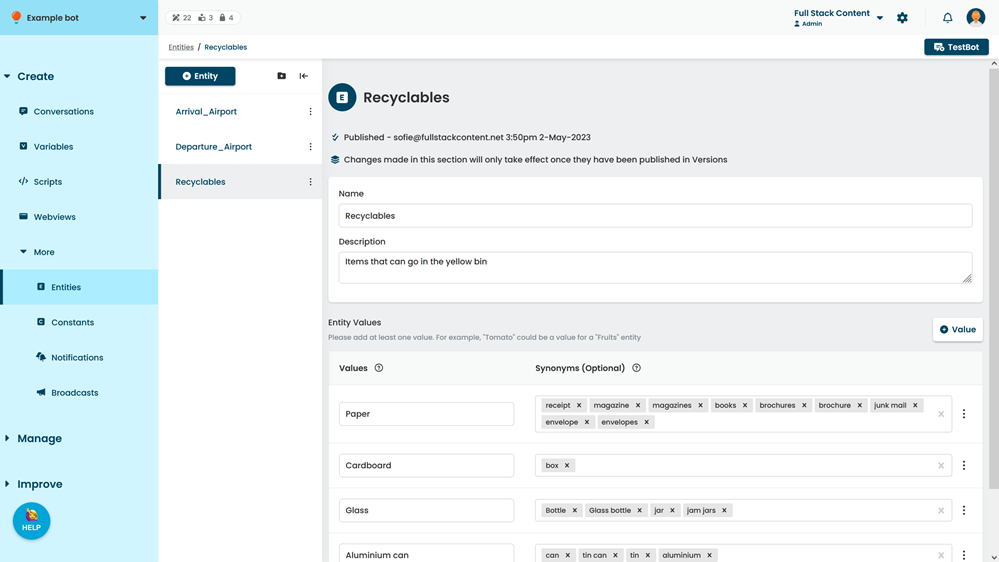
- Find the entity Value you want to add a synonym to.
- In the Synonyms field beside the value, type the synonym to add, then press enter.
- Click Save.
You must publish these changes before they'll appear in your live chatbot.