Create a custom entry point to send users a different passage when they interact with your chatbot from a special URL such as a QR code.
This is a more advanced method of creating entry points for developer features. If you want to create an entry point that triggers based on the URL the user came from, create an entry point for a URL.
To create a custom entry point:
- Click Manage in the left navigation, then click Entry Points.
- Click + Entry Point.
- Type a descriptive name for the entry point.
Your users will never see this name. Choose something to indicate the entry point's purpose. - Click Create.
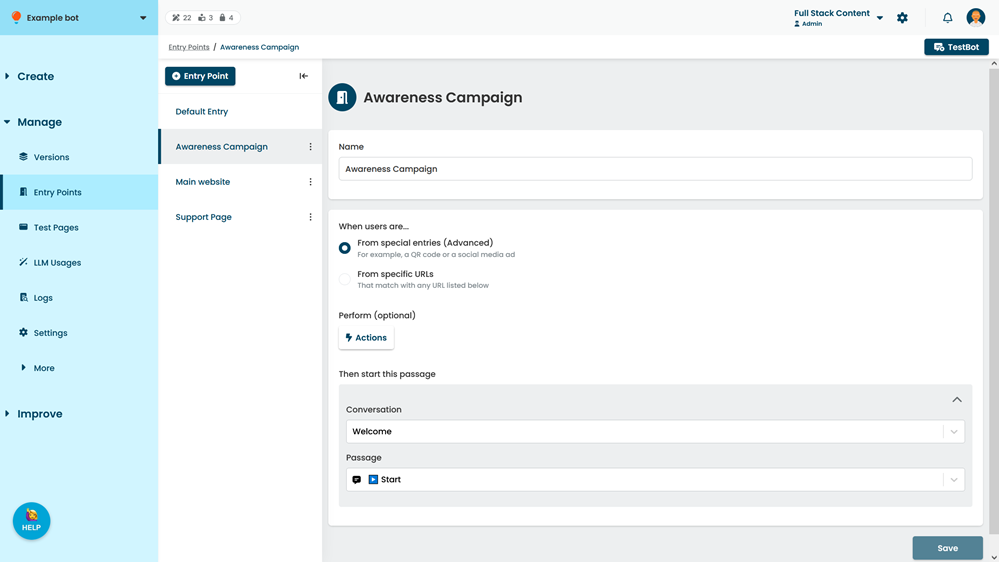
- In the new entry point, select From special entries (Advanced).
- If you want to perform actions when this entry point is triggered, click Actions.
- Select the Conversation and Passage you want to start when this entry point is triggered.
A preview of the passage is displayed. You can also open the passage in a new tab. - Click Save.
Once you've created your custom entry point, you can generate a URL so users can access it.