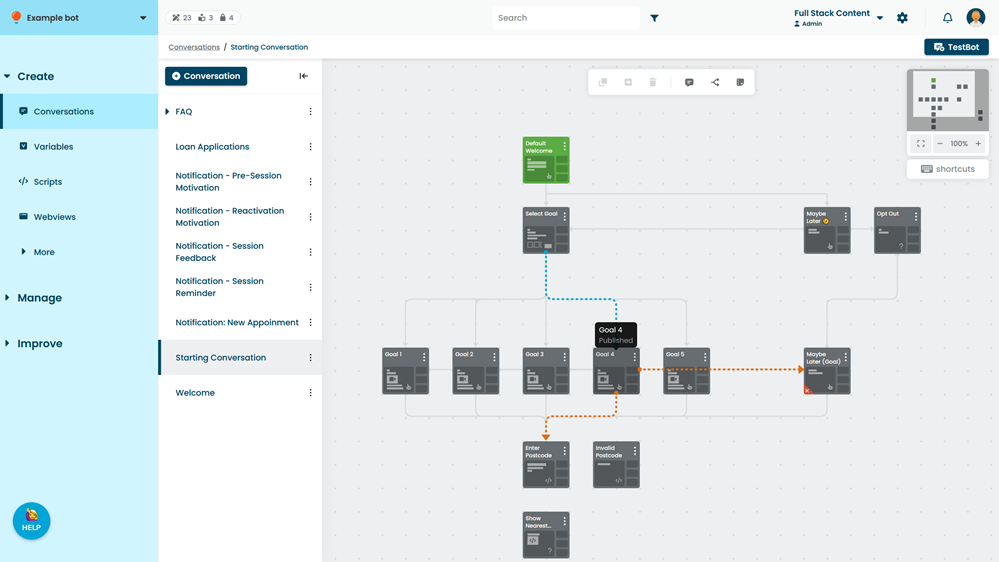
You can see where one passage or logic starts another by the flow lines that connect them.
Flow lines are displayed when a passage and logic starts another passage or logic in the same conversation using buttons, Quick Replies, Send Info configurations, outbound questions, logic tabs, or Else sections. Flow lines aren't displayed when the passage is started by a passage or logic from another conversation, by a script, or by inbound questions.
Hover your mouse over a passage or logic to see which content starts it (in blue) and which passages or logic it starts (in orange). Passages and logic can also start passages and logic in other conversations.
You can click-and-drag passage and logic to arrange them in the canvas. Flow lines automatically adjust to the new position. Moving a passage or logic on the canvas doesn't appear as a change in versions.