Use the data retention settings to control how long your chatbot:
- Retains conversation data to be used in reviews.
- Stores user data when a chatbot user has not interacted with your chatbot.
When you make changes to your chatbot's data retention settings, these changes are stored in the chatbot version. Changes here will not be applied until they are published.
You need an administrator role on your team to edit chatbot settings.
To open the data retention settings:
- Click Manage in the left navigation, then click Settings.
- Click Data Retention.
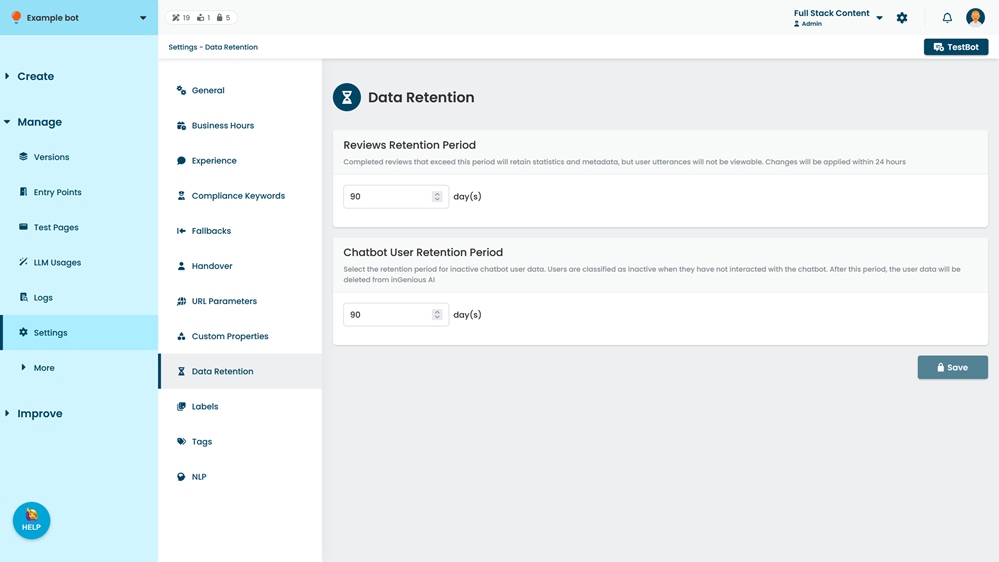
Reviews Retention Period
Control how long your chat transcripts are retained on the inGenious AI platform to manage sensitive data users may send.
Chat transcripts are stored to help improve your NLP questions using reviews. Once past the retention period, the chatbot user question is deleted. This means:
- If the question has not been marked, it is not included in new reviews.
- If the question has been marked, it is not available when viewing completed reviews.
Your review retention period does not affect:
- Review statistics and recommendations.
- User metadata and audience information, such as when the chatbot user last interacted with your chatbot.
- User data stored by scripts or webviews.
- User notifications or broadcast subscriptions.
The minimum review retention period is 30 days.
Chatbot User Retention Period
Control how many days a chatbot user can go without interacting with your chatbot before they are considered inactive, and their chatbot user data is deleted.
The default is 90 days. This means if your chatbot user does not interact with your chatbot for 90 days, they are considered inactive, and their user data is deleted.