Data stores provide your scripts with lookup tables that you can update without republishing the chatbot, so your chatbot can respond to updates in real time. Use data stores to provide lookups for additional context, provide a list of single-use values, or create a dynamic flow that redirects your conversation using up-to-date data.
You can use a data store as:
- A lookup table, by accessing rows at specific indexes.
- A list of single-use values like promotional codes, by using the data store's last used index function.
You can bulk-add data store data in the inGenious AI platform by uploading a CSV or add and remove data store items using data store functions to update your data automatically.
You must create a data store and upload a CSV before you can use the data store in your scripts. At minimum, the CSV must have all the column headings for your data.
Data store ID
Data stores are identified by the data store ID. To find the data store ID:
- Click Manage > More in the left navigation then click Data Stores.
- Click the menu next to the data store you want to use.
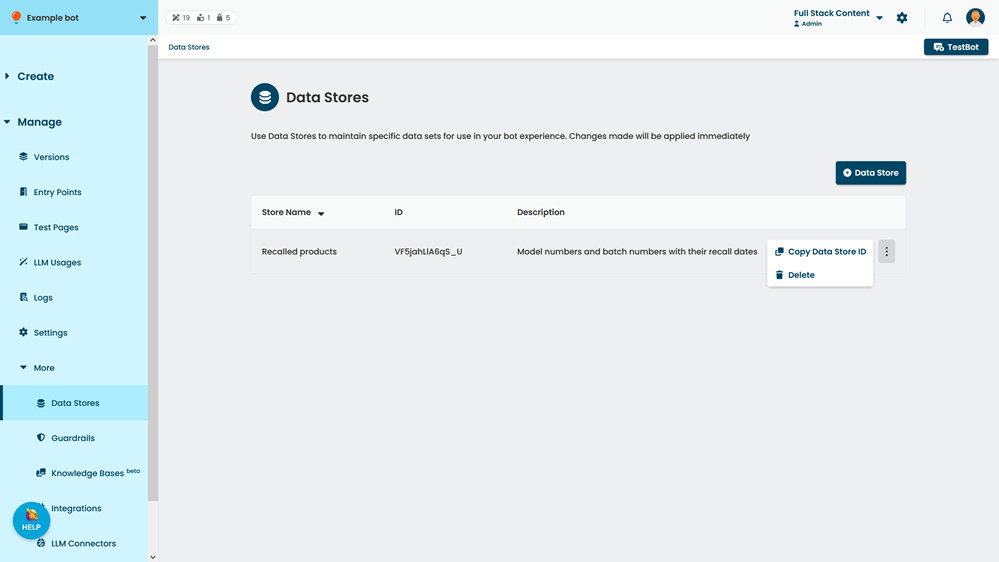
- Click Copy Data Store ID.
addObject(id, data)
Add an item to the data store. The data structure must match the CSV column headings of the data store.
This call is asynchronous, so you should await it.
| Parameter | Type | Required | Description |
|---|---|---|---|
| id | string | Yes | The data store ID. |
| data | object | Yes | Object representing a row of data to add as key value pairs of the column name and value. |
//add an item to the data store
let dataStoreId = 'xyzabc1';
await bot.dataStore.addObject(dataStoreID, {
    'Date': feedbackTime,
    'Rating': contextData.rating,
    'Feedback': contextData.message}
);
done();deleteObjectAtIndex(id, index)
Delete the item at the specified index from the data store.
Data store data is indexed in the order the data appears in the CSV. The index includes the header row, so data retrieval should start at an index of 1.
If you delete a row before the data store's last used index, the last used index is not decreased to account for the deleted items.
This call is asynchronous, so you should await it.
| Parameter | Type | Required | Description |
|---|---|---|---|
| id | string | Yes | The data store ID. |
| index | int | Yes | The index of the row to delete. |
//delete the first item in the data store
let dataStoreId = 'xyzabc1';
await bot.dataStore.deleteObjectAtIndex(dataStoreId, 1);
done();
To guard against accidental deletion, only individual items can be deleted using data store functions. If you want to clear all data from a data store, you must use the inGenious AI web platform.
getAllObjects(id)
Get an array of all items in the data store. Each item is returned as a JSON object with the data store column headers as property keys.
This call is asynchronous, so you should await it.
| Parameter | Type | Required | Description |
|---|---|---|---|
| id | string | Yes | The data store ID. |
//fetch all items in the data store
let dataStoreId = 'xyzabc1';
let data = await bot.dataStore.getAllObjects(dataStoreId);
//find the item you're looking for...
done();getDataStoreNextUnusedIndex(id)
Get the next unused index of the data store and increment the index. Use getObjectAtIndex to fetch the data from that index.
Use this function to iterate through a list such as a list of unique promotional codes. Calling this function increments the data store's last used index. You can check the last used index of a data store on the data store page.
| Parameter | Type | Required | Description |
|---|---|---|---|
| id | string | Yes | The data store ID. |
//fetch the next unused item from the data store
let dataStoreId = 'xyzabc1';
let index= await bot.dataStore.getDataStoreNextUnusedIndex(dataStoreId);
let data = await bot.dataStore.deleteObjectAtIndex(dataStoreId, index);
done();getObjectAtIndex(id, index)
Get the item at the specified index from the data store. The data is returned as JSON with the data store column headers as property keys.
Data store data is indexed in the order the data appears in the CSV. The index includes the header row, so data retrieval should start at an index of 1.
This call is asynchronous, so you should await it.
| Parameter | Type | Required | Description |
|---|---|---|---|
| id | string | Yes | The data store ID. |
| index | int | Yes | The index of the row to get. |
//fetch the first item in the data store
let dataStoreId = 'xyzabc1';
let data = await bot.dataStore.deleteObjectAtIndex(dataStoreId, 1);
done();