Create a data store to contain a new set of data to use with scripts in your chatbot.
Data stores have a maximum file size of 20Mb and can have a maximum of 500,000 cells. For example, a data store with five columns could have up to 100,000 rows, and a data store with two columns could have up to 250,000 rows.
Keep your data stores very specific, such as a lookup of legacy product names to current product names, or a set of support ticket numbers that should receive priority support. Don't combine data for different purposes into one data store.
Data stores do not need to be published and are available to your chatbot immediately.
To create a data store:
- Click Manage > More in the left navigation then click Data Stores.
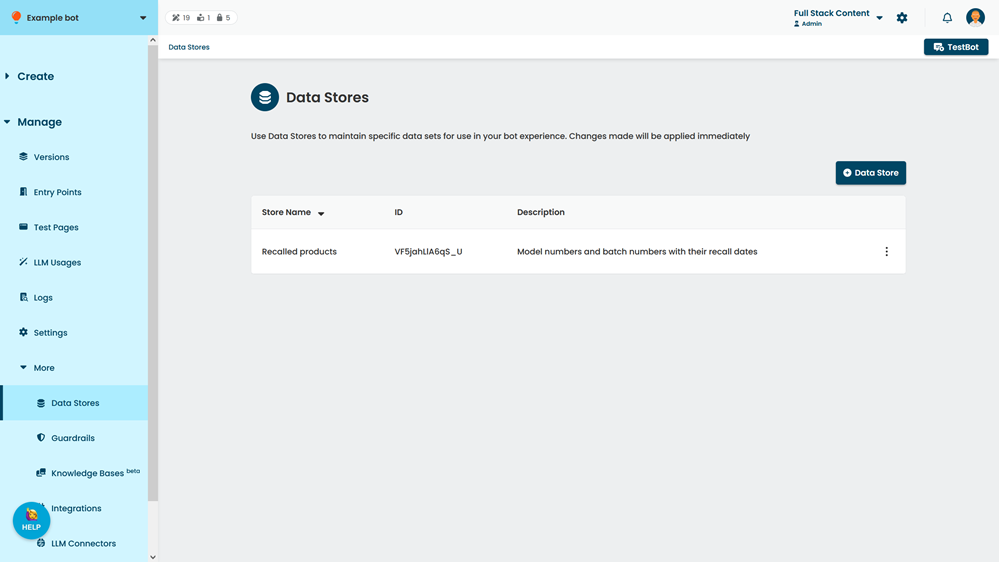
- Click + Data Store.
- Type a descriptive Name for your data store
Data store names do not have to be unique, but we recommend using unique names. You can change this later. - In the data store page, add a Description to describe what the data store should be used for.
- Click Save.
Once you have created your data store, add data by uploading a CSV file.