The Else section defines what the chatbot should do when none of the logic tabs' conditions match. The chatbot checks each tab in turn from left to right, and if it can't find any tab where the conditions match, it follows the instructions in the Else section.
There is only one Else section, no matter how many tabs your logic contains.
The Else section contains:
- Actions the chatbot should perform, such as setting a variable value or scheduling a notification.
- The script to run or the passage the chatbot should start.
To define the Else section:
- Click Create in the left navigation, then click Conversations.
- Click the conversation with the logic you want to edit.
- Open the logic you want to edit.
-
Scroll to the bottom of any tab in the logic.
The Else section is visible no matter which tab is open.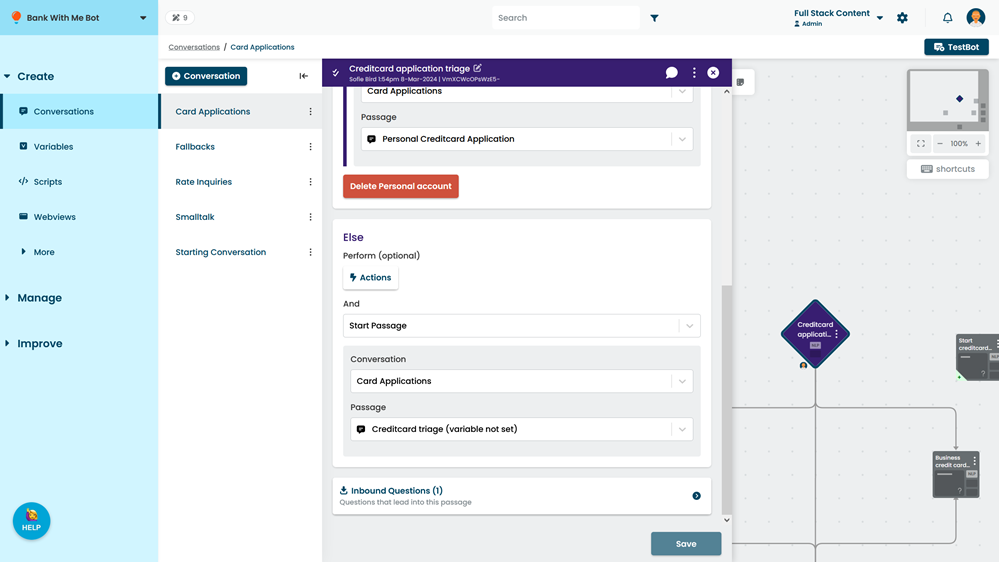
- If you want to perform actions when none of the tabs match, click Actions and configure them.
Actions you define here are performed after any actions added via the logic menu button, but before the logic runs the script or directs the flow to the selected passage. - Select either Start Passage or Run Script.
- Select the passage to start or script to run.
- Click Save.