The functions in the bot.user namespace are used to get and set chatbot user data, subscribe chatbot users to broadcasts, and schedule notifications.
Jump to:
- Access tokens
- Conversation, flow, and question state
- Constants, variables, entities, and context data
- Language
- Subscriptions and notifications
- Tags
Access tokens
getShortLivedAccessToken(data)
Get an access token to call the chatbot’s webview endpoints from outside the chatbot. Access tokens are valid for 30 minutes. See Webviews for more information.
| Parameter | Type | Required | Description |
|---|---|---|---|
| data | object | Optional | Any data you want to store against the access token. |
//Generate an access token for another API to call the bot.
var token = bot.user.getShortLivedAccessToken();
done();
Conversation, flow, and question state
getConversationState()
Returns a JavaScript object describing the passage ID and conversation title of all conversations the chatbot user is currently engaged in, represented as a stack.
const conversationState = bot.user.getConversationState();

if (conversationState && conversationState.stack.length > 0) {
  const lastConversationId = conversationState.stack.pop();

  if (conversationState.state[lastConversationId] && conversationState.state[lastConversationId].passageId) {
    const lastPassageId = conversationState.state[lastConversationId].passageId;

    await bot.flow.switchConversation(lastConversationId);
    await bot.flow.startPassage(lastPassageId);
  }
}

done();
Example response:
{
  "state": {
    "XXXXX": {
      "passageId": "AAAAAA",
      "conversationTitle": "Conversation 1"
    },
    "YYYYY": {
      "passageId": "BBBBBB",
      "conversationTitle": "Conversation 2"
    }
  },
  "stack": ["XXXXX", "YYYYY"]
}
getFlowState()
Returns a JavaScript object describing:
- The chatbot's current conversation and passage.
- The context that any question sent by the chatbot user will be first evaluated in.
- Whether the chatbot is between messages (true) or has reached the end of a flow.
const flowState = bot.user.getFlowState();

if (!flowState) {
  done();
  return;
}

bot.channel.sendTextMessage(`Your last message was at  ${flowState.lastMessageTimestamp}`, params);
done();
Example response:
{
  "conversationId": "XXXXX",
  "passageId": "YYYYY",
  "questionContext": {
    "conversationId": "AAAAAA",
    "passageId": "BBBBBB"
  },
  "betweenMessages": true,
  "botData": {
    "NLP": null
  }
}
getQuestionState()
Returns a JavaScript object containing:
- The question ID of each question that the chatbot user has triggered in the chatbot.
- The number of times that question has been triggered.
- The number of seconds until that question expires.
Expired questions are deleted from the user's Question State.
const questionState = bot.user.getQuestionState();

// The 'catchall-question' is the chatbot fallback passage
if (questionState && questionState.askedQuestions['catchall-question']) {
  bot.channel.sendTextMessage(`You triggered catch all ${questionState.askedQuestions['catchall-question'].count} times`, params);
}

done();
Example response:
{
  "askedQuestions": {
    "catchall-question": {
      "count": 2,
      "expiry": 1609910774.807
    },
    "XXXXXX": {
      "count": 1,
      "expiry": 1609910807.384
    },
    "YYYYYY": {
      "count": 1,
      "expiry": 1609910853.932
    }
  }
}
Constants, variables, entities, and context data
getConstants()
Get the values of all constants in your chatbot. Constants are returned as a dictionary of the constant ID and corresponding value. Constant values are always a string.
//Get all constants in your chatbot
var botConstants = bot.user.getConstants();
done();
The constants are returned as a dictionary object:
//Response when two constants have been created
{
  OkIhAS7uWd0ror: "03 9568 4567",
  gUZUxHM2Afct4c: "Example Company"
}
done();
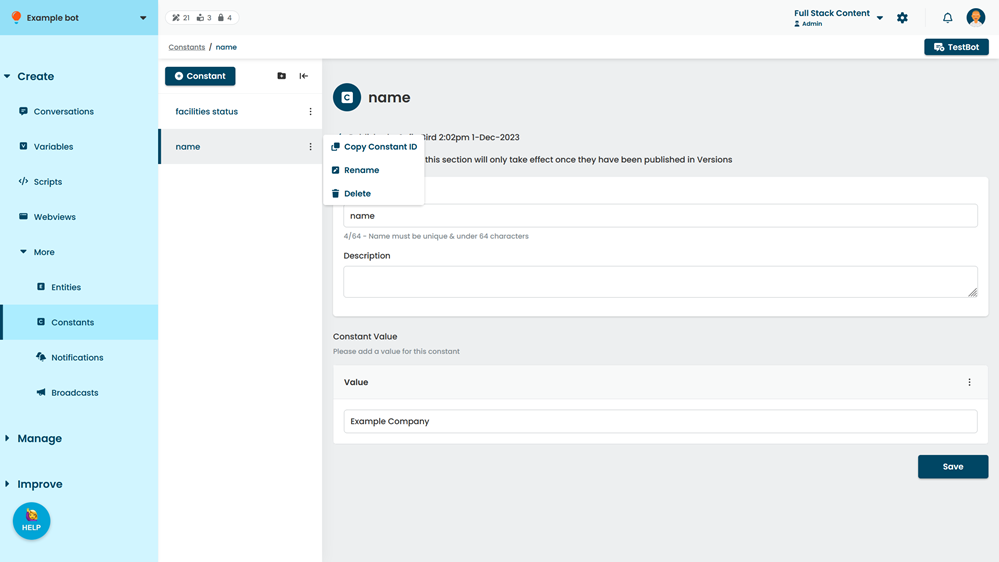
To find the constant ID:
- Click Create > More in the left navigation, then click Constants.
- Click the menu next to the constant, then click Copy Constant ID.
getVariables()
Get the values of all variables that have been assigned for this chatbot user. Only variables that have been set for this chatbot user or have a default value are returned. Variables are returned as a dictionary of the variable ID and corresponding value. Variable values are always a string.
//Get a dictionary of all variables assigned to the user
var uservariables = bot.user.getVariables();
done();
The variables are returned as a dictionary object:
//Response when two variables have been set.
{
  OkIhAS7uWd0ror: "Jimmy",
  gUZUxHM2Afct4c: "37"
}
done();
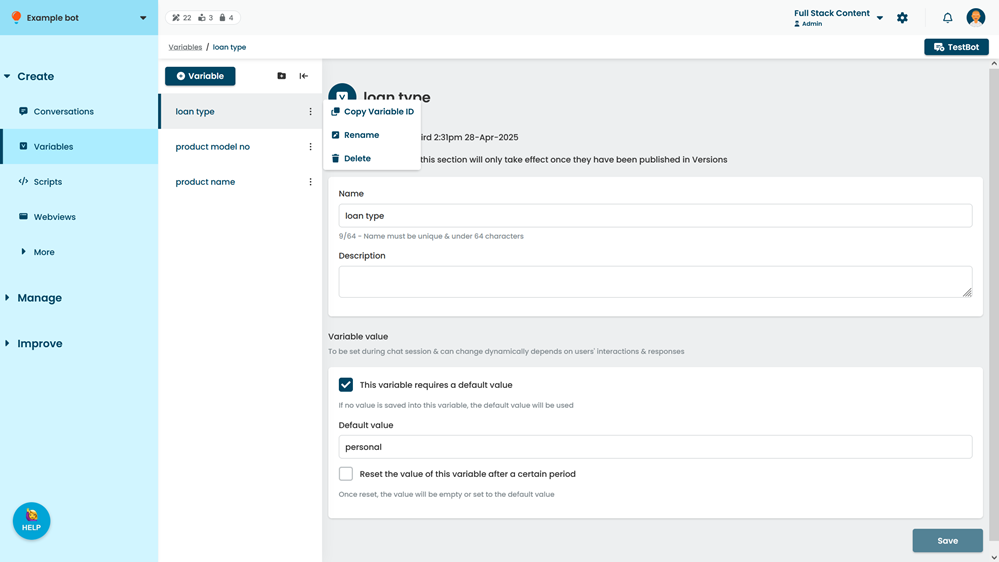
To find the variable ID:
- Click Create in the left navigation, then click Variables.
- Click the menu next to the variable, then click Copy Variable ID.
setVariables()
This method is asynchronous.
Set the value for one or more variables for a chatbot user. The variables and values to set must be provided as a dictionary of the variable ID and the value to set. Values are always strings. If one of the variables already has a value stored for the chatbot user, it will be overwritten.
Variables must have already been created in the chatbot to be set by scripts. If you want to save chatbot user information without creating a chatbot variable, use the saveContextData() function.
| Parameter | Type | Required | Description |
|---|---|---|---|
| - | object | Required | A dictionary of each variable ID and the value you want to store. |
//Set the values of two variables.
await bot.user.setVariables({
  OkIhAS7uWd0ror: "Jimmy",
  gUZUxHM2Afct4c: "37"
});
done();
To find the variable ID:
- Click Create in the left navigation, then click Variables.
- Click the menu next to the variable, then click Copy Variable ID.
clearAllVariables()
This method is asynchronous.
Reset the values for all variables that have been set for this chatbot user. Variables are reset to their default values. Any variable that does not have a default value will be treated as blank.
//Clear all variables set for the user. This method is asynchronous.
await bot.user.clearAllVariables();
done();getDetectedEntities()
Get the values of all entities that were assigned a value by a training phrase in the current passage. Entity values are assigned by training phrases in questions. Entities only retain their value within the context of the passage where the value was assigned. Once the chatbot starts another passage, the entity value is cleared.
// Get all detected entities of the current passage
const detectedEntities = bot.user.getDetectedEntities();
done();
Entities are returned as a dictionary of the entity ID and an object representing the entity. Only entities with values are returned.
// Response when a Address entity has been detected
{
 "Acp6uKM7CATRkS": {
  "value": "melbourne",
  "id": "Acp6uKM7CATRkS",
  "name": "Address",
  "systemEntity": true
 }
}
done();
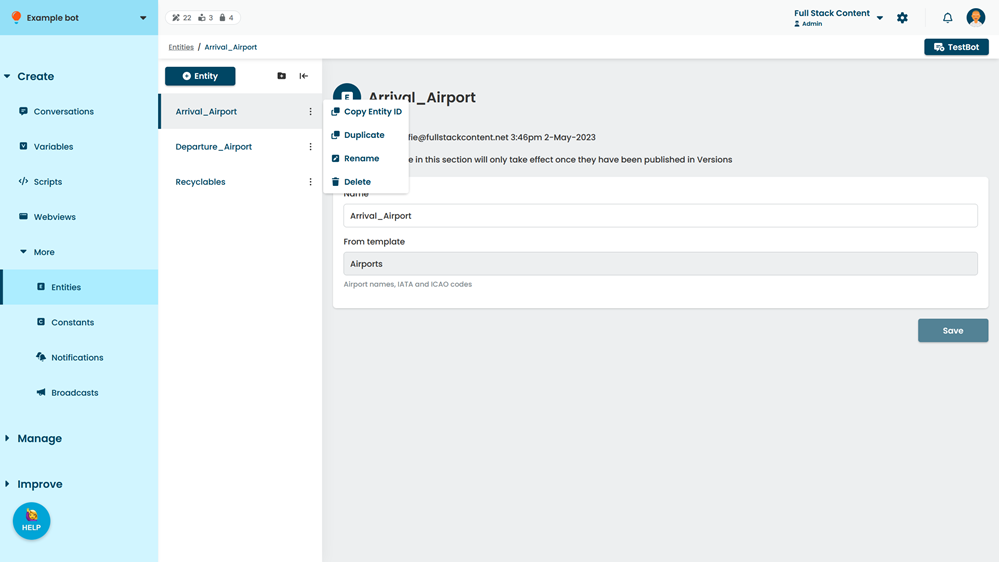
To find the constant ID:
- Click Create > More in the left navigation, then click Entities.
- Click the menu next to the entity, then click Copy Entity ID.
getContextData()
Returns a JavaScript object of all custom data stored for the chatbot user.
//Retrieve the user’s email address
const contextData = bot.user.getContextData();

bot.channel.sendTextMessage(`Is your email address: ${contextData.email}?`, params);
done();
What's the response?
Your response data depends on what context data you have stored for your chatbot users.
saveContextData(data)
Store custom user data as key-value pairs. Storing a value for a key that already exists will overwrite the existing value.
Context data can only be used by scripts. If you want to make chatbot user information available to be used in chatbot content placeholder chips, use a variable.
| Parameter | Type | Required | Description |
|---|---|---|---|
| data | Object | Required | An object containing the key-value pairs to store. |
//Save user input into context data before starting the next passage.
const userInput = params.text;
// params.text contains the value of user text input, if it is set

if (userInput) {
  await bot.user.saveContextData({ email: userInput }); // save the user input
  bot.flow.startPassage('123456'); // next passage in the flow
} else {
  bot.flow.startPassage('abcdef'); // re-enter email passage
}

done();
clearContextData()
Clear all stored custom user data for this chatbot user.
bot.user.clearContextData();
done();
Language
setLanguage(language)
If your chatbot is configured for multiple languages, set the language to use when matching NLP questions with this chatbot user. The language must be listed in your NLP settings and supported by dialogflow.
| Parameter | Type | Required | Description |
|---|---|---|---|
| language | string | Required | The two-letter code for the language. See the dialogflow language codes. |
bot.user.setLanguage("fr");
done();
Subscriptions and notifications
subscribe()
Subscribe the chatbot user to broadcasts.
bot.user.subscribe();
done();
unsubscribe()
Unsubscribe the chatbot user from broadcasts.
bot.user.unsubscribe();
done();scheduleNotification(notificationId, referenceDate)
Schedule a notification for the chatbot user.
| Parameter | Type | Required | Description |
|---|---|---|---|
| notificationId | String | Required | The ID of the notification to schedule. |
| referenceDate | Date | Required | The date and time from which to schedule the notification. Remember to set the timezone and locale within the script. |
//Schedule a notification with the id of 123456
const appointmentDate = getMoment("2020-12-25T09:30:00").toDate();
bot.user.scheduleNotification('123456', appointmentDate);
done();
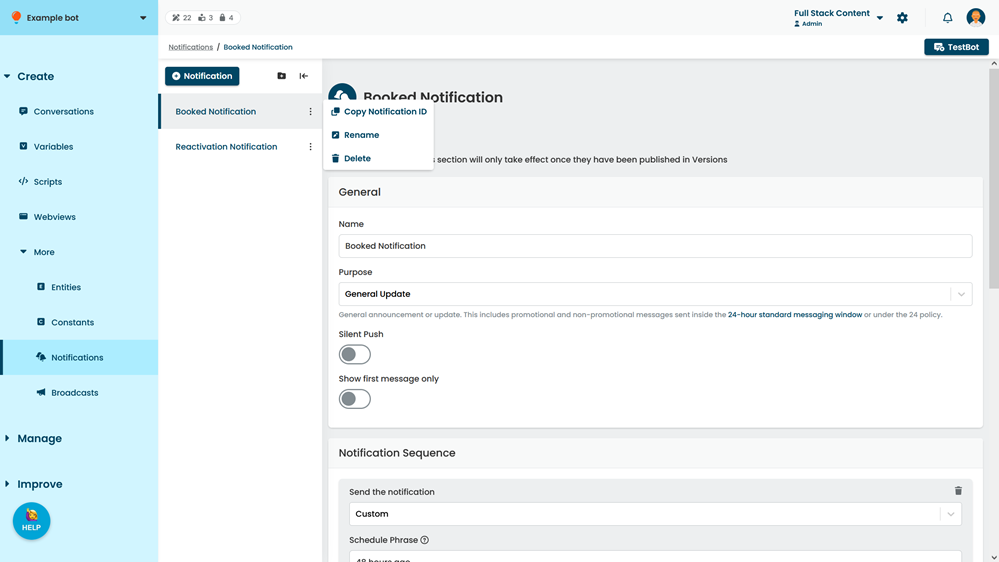
To find the notification ID:
- Click Create > More in the left navigation, then click Notifications.
- Click the menu next to the notification, then click Copy Notification ID.
unscheduleNotification(notificationId)
Delete a scheduled notification from the chatbot user.
| Parameter | Type | Required | Description |
|---|---|---|---|
| notificationId | String | Required | The ID of the notification to delete. |
//Unschedule the notification with the id 123456
bot.user.unscheduleNotification('123456’);
done();
To find the notification ID:
- Click Create > More in the left navigation, then click Notifications.
- Click the menu next to the notification, then click Copy Notification ID.
Tags
getTags()
Retrieve an array of the tags that have been applied to the chatbot user's conversation. Tags are listed by ID.
bot.user.getTags();
done();
addTags()
Apply an array of tags to the chatbot user's conversation. Tags must be listed by ID. Any tag that has already been applied to the chatbot user is ignored.
bot.user.addTags(["g823uhg7", "8fhj339d"]);
done();
removeTags()
Remove an array of tags from the chatbot user's conversation. Tags must be listed by ID. Any tag that had not been applied to the conversation is ignored.
bot.user.removeTags(["g823uhg7", "8fhj339d"]);
done();
removeAllTags()
Removes all tags that have been applied to the chatbot user's conversation.
bot.user.removeAllTags();
done();