You can add parameters to your script so it's easier for content creators to make simple updates such as changing business operating hours. Parameters can be made available:
- To individual scripts, by adding them to the script's configuration. Values for these parameters are defined separately each time the script is configured in a passage, and can use placeholder chips for variables and constants.
- To all scripts, by adding them in your chatbot settings. Values for these parameters are defined only once and shared by all scripts.
To add a parameters to an individual script:
- Click Create in the left navigation, then click Scripts.
- Click the script you want to add parameters to.
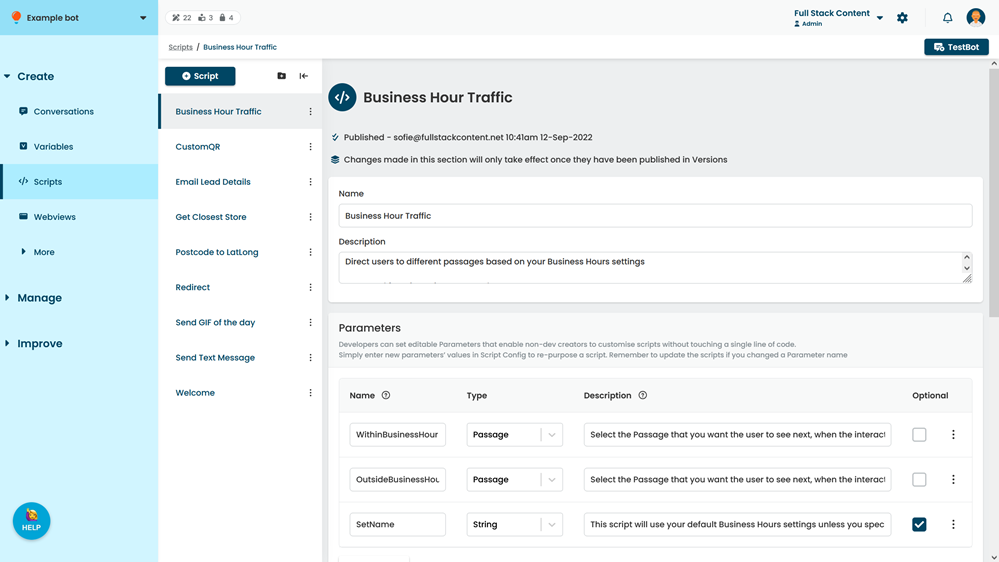
- In the Paramters section, click + Parameter.
- Type the Name of the parameter.
This is the variable name used in the script. - Add a Description to help your content creators understand how to use the parameter.
Consider adding:- A brief explanation of the parameter, if it might not be clear from the name.
- An example of how to correctly format the value.
- If the parameter is optional, select the Optional checkbox.
Otherwise, the content creator must configure a value here when they add the script to a passage. - Click Save.