Web crawler data sources download data from public web pages. Starting from a designated source page, they download each page they can find, and any pages or documents linked from that page. You can add regular expressions to control which pages are included or excluded from the web crawl.
Regular expressions are a method of defining flexible patterns to be searched in text. If you're not familiar with regular expressions, you can learn more from this quickstart guide. Keep your regular expressions simple: look-ahead expressions and extensive backtracking are not supported.
You can add:
- Up to ten source URLs where the web crawler will begin downloading.
You can configure whether or not the crawler should include subdomains when crawling.
Pages that are not in these domains will not be downloaded.
If you want to download a specific page from another domain, you can add an inclusion pattern for that page. - Up to 25 regular expression patterns of URLs to exclude.
URLs that match these patterns will not be downloaded.
If you want to download a specific page that matches your exclusion patterns, you can add an inclusion pattern for that page. - Up to 25 regular expression patterns of URLs to include.
URLs that match these patterns will be downloaded, even if they also match an exclusion pattern or don't belong to your source URL domain.
You can also configure some limits to ensure your web crawler doesn't negatively impact the performance of the web page as it crawls:
- The maximum number of pages to visit.
This number must be higher than the number of source URLs you specify. If you have selected to include subdomains, the maximum pages must be higher than the number of source URLs plus all their subdomains. - The number of pages the crawler should visit per minute.
Visiting a high number of pages per minute may be interpreted as a cyber attack by the web site you are crawling, which could result in the crawler being blocked from accessing the web site. Lower numbers have less impact on the web page but take longer to sync.
Configure a web crawler
To configure a web crawler:
- Click Manage > More in the left navigation, then click Knowledge Bases.
- Click the knowledge base of the data source you want to update.
- Click the name of the data source you want to configure.
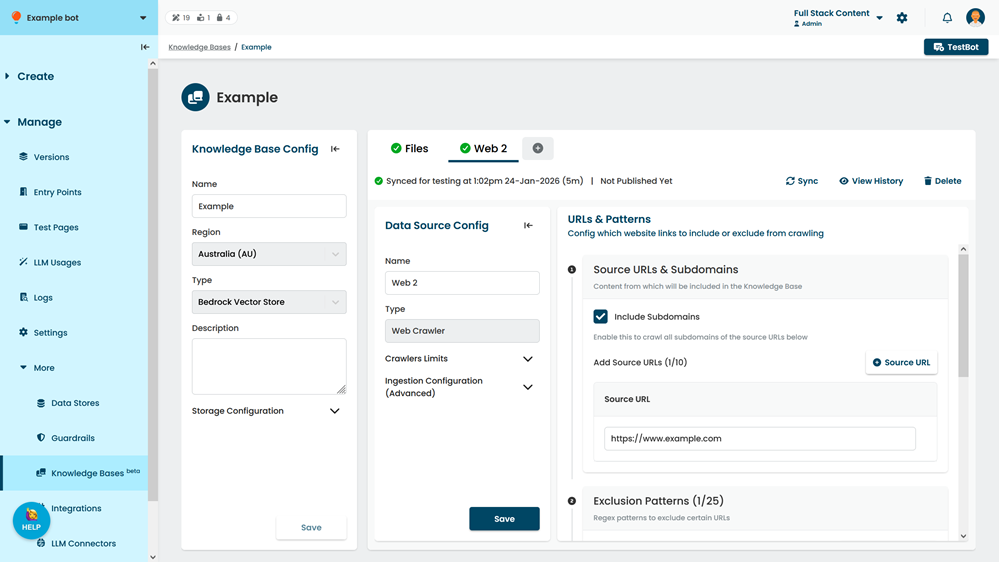
- If you want to also crawl the subdomains of the source URLs, select Include Subdomains.
For example, if your source URL is example.com, including subdomains would also crawl info.example.com. - If you want to add additional source URLs, click + Source URL and type the URL in the new field.
You can add up to ten source URLs.
Pages that are not in these domains won't be crawled unless you add an inclusion pattern for them. - If you want to prevent some URLs from being crawled:
- Click + Exclusion Pattern.
- Type the regular expression to exclude.
Remember to use '' to escape special characters like '/' and '.'. You can use a platform like Regex101.com to test your regular expression.
You can add up to 25 regular expressions.
- If you want to ensure some URLs are crawled:
- Click + Inclusion Pattern.
- Type the regular expression to include.
Remember to use '' to escape special characters like '/' and '.'. You can use a platform like Regex101.com to test your regular expression.
You can add up to 25 regular expressions.
- If you want to configure the maximum number of pages crawled or the crawl speed:
- In the Data Source Config panel, expand Crawler Limits.
- Update the Max Pages you want the web crawler to visit.
This must be higher than the total number of source URLs you have added, including their subdomains if you've selected to include subdomains. - Update the Pages Crawled per Minute.
Use caution if increasing this number. Crawling too many pages per minute may result in the crawler being blocked from accessing the web site.
Use a lower number to reduce the performance impact on the web page. Crawling fewer pages per minute means the data source will take longer to sync.
- Click Save.