log(message, level, metadata)
Send a message to the chatbot log with a severity level and optional metadata. The messages from the past seven days are available in your chatbot's Logs page.
Log messages are never visible to chatbot users and they don't appear in TestBot.
| Parameter | Type | Required | Description |
|---|---|---|---|
| message | String | Required | The message to send to the log. |
| level | String | Required |
Logging level to use. Must be one of:
|
| metadata | Object | Required | JSON object of additional metadata to send. |
//Setting a variable
let variableData = {OkIhAS7uWd0ror: "Green"};

bot.util.log("Storing the variable value", "debug", variableData);
await bot.user.setVariables(variableData);

done(err);
sendEmail(fromAddress, toAddresses, subject, message, options)
Send an HTML email to one or more recipients via Amazon Simple Email Service (SES). The email is formatted with a template that can be customised using the options parameter. This method is asynchronous.
| Parameter | Type | Required | Description |
|---|---|---|---|
| fromAddress | String | Required |
The email address the email appears to be sent from. This must be a valid email address. The fromAddress will be validated by Amazon SES before the email is sent. |
| toAddresses | Array<String> | Required | List of email addresses to send the email to. |
| subject | String | Required | Subject line of the email. |
| message | String | Required | Message body of the email. |
| options | Object | Optional |
Options to customise the email template by overriding the:
See the table below for details. |
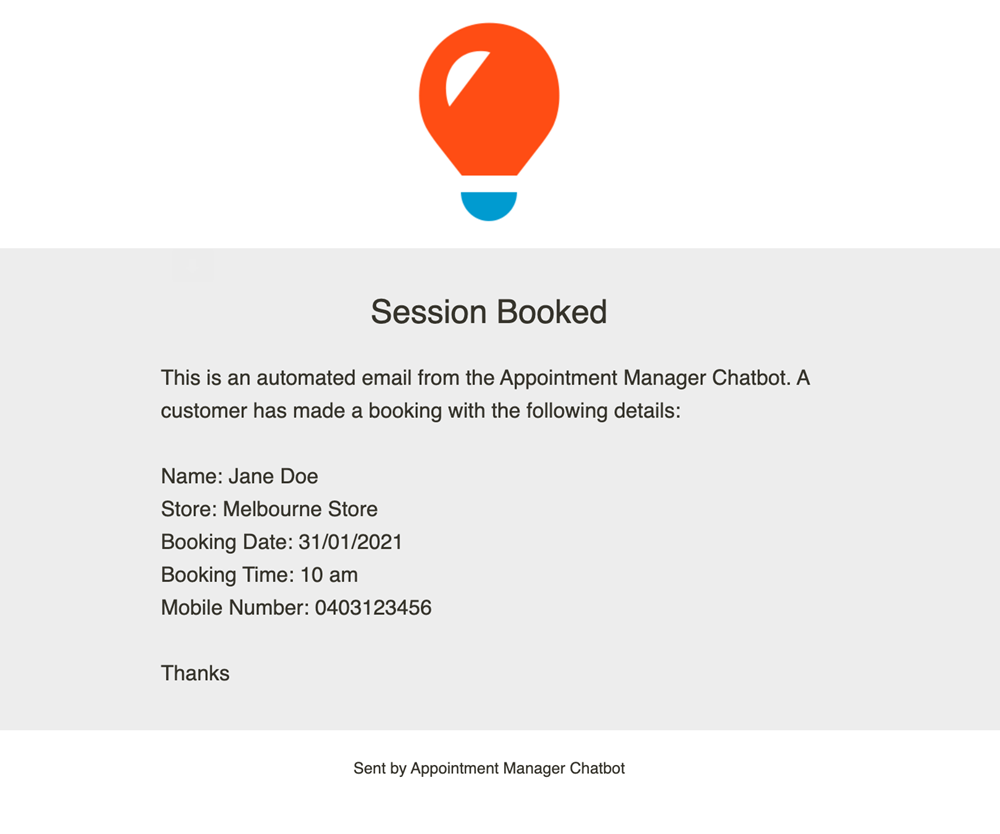
Template options
| Parameter | Type | Description | Default value |
|---|---|---|---|
| options.headingLogo | String | Image or logo that appears in the heading of the email. | The inGenious AI logo. |
| options.heading | String | Heading that appears below the logo and before the introductory text. | The subject of the email. |
| options.intro | String | Introductory text that appears between the heading and the message body. | This is an automated email from the {chatbot name} Chatbot. |
| options.close | String | Text that appears after the message body. | Thanks |
| options.botName | String | Name of the chatbot, used for the default introductory text, and the "Sent by" message after the closing text. | The chatbot name as listed in the Chatbot Settings. |
const contextData = bot.user.getContextData();

// Amazon SES validated email address. Contact Ingenious AI to validate non ingenious.ai domain email addresses.
const fromAddress = 'Ingenious AI Appointment Manager Bot <notify-noreply@ingenious.ai>';

// Email addresses you want to send to, multiple addresses separated by comma
const toAddresses = ['name1@example.com','name2@example.com'];

const subject = `Appointment Manager Chatbot Booking ${bot.user.firstName} ${bot.user.lastName}`;
const message = `Name: ${bot.user.firstName} ${bot.user.lastName}
 Store: ${contextData.store}
 Booking Date: ${contextData.slotDate}
 Booking Time: ${contextData.slotTime}
 Mobile Number: ${contextData.mobileNumber}`;

const options = {
  heading: 'Session Booked',
  intro: 'This is an automated email from the Appointment Manager Chatbot.  A customer has made a booking with the following details:',
  botName: 'Appointment Manager Chatbot'
};

try {
  const emailResult = await bot.util.sendEmail(fromAddress, toAddresses, subject, message, options);

  bot.channel.sendTextMessage("You're all booked 👍", params);
  done();
} catch (err) {

  bot.channel.sendTextMessage("Sorry, something went wrong with your booking 😔. Do you want to try again?", params);
  done(err);
}