Create a child test page to test a specific entry point. Child pages use the same integration, styling, and bot widget code as their parent page.
Test pages are designed to keep things simple so you can focus on testing and styling your chatbot widget. You can add a title and subtitle to make it easy to identify individual pages when you're testing, but you can't add custom CSS, bot widget code, HTML or other content.
To create a child test page:
- Click Manage in the left navigation, then click Test pages.
- Click the menu next to the test page you want to create a child page for.
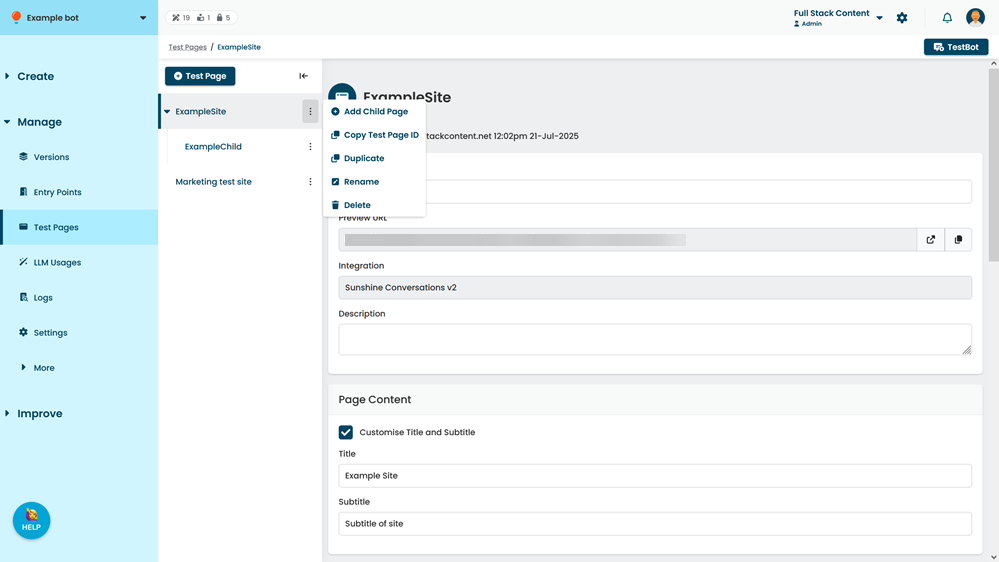
- Click Add Child Page.
- Type a Name for the child page.
You can change this name later. - Type a brief Description of the child page to help your team understand what you're testing.
- If you want to customise the page title and subtitle:
- Select Customise Title and Subtitle.
- Type a Title and Subtitle to use on the page.
- Click Save.
Once you've created your child page, copy the Preview URL and add it to an entry point as an exact match to start testing.