We have our entities and our passage, it's time to create the questions that will capture the cities the chatbot user mentions and store them in our entities.
Let's take a quick look at how entities work:
- An entity has a set of values, which are words or phrases that should match the entity.
- When your chatbot user asks a question, the chatbot matches it against all its training phrases.
- If the training phrase that best matches the question uses an entity, the chatbot compares the chatbot user's question to the entity values:
- If the words the chatbot user mentioned match a value in the entity, that value is assigned as the entity's value for the passage.
- If the words the chatbot user mentioned don't match any of the entity's values, the training phrase is still selected, but the entity value is blank.
In this case, the chatbot compares the chatbot user's words to all the city names in the entity template. If the chatbot user asks to fly between two made-up cities, our training phrases will still match, but the entity values will be blank.
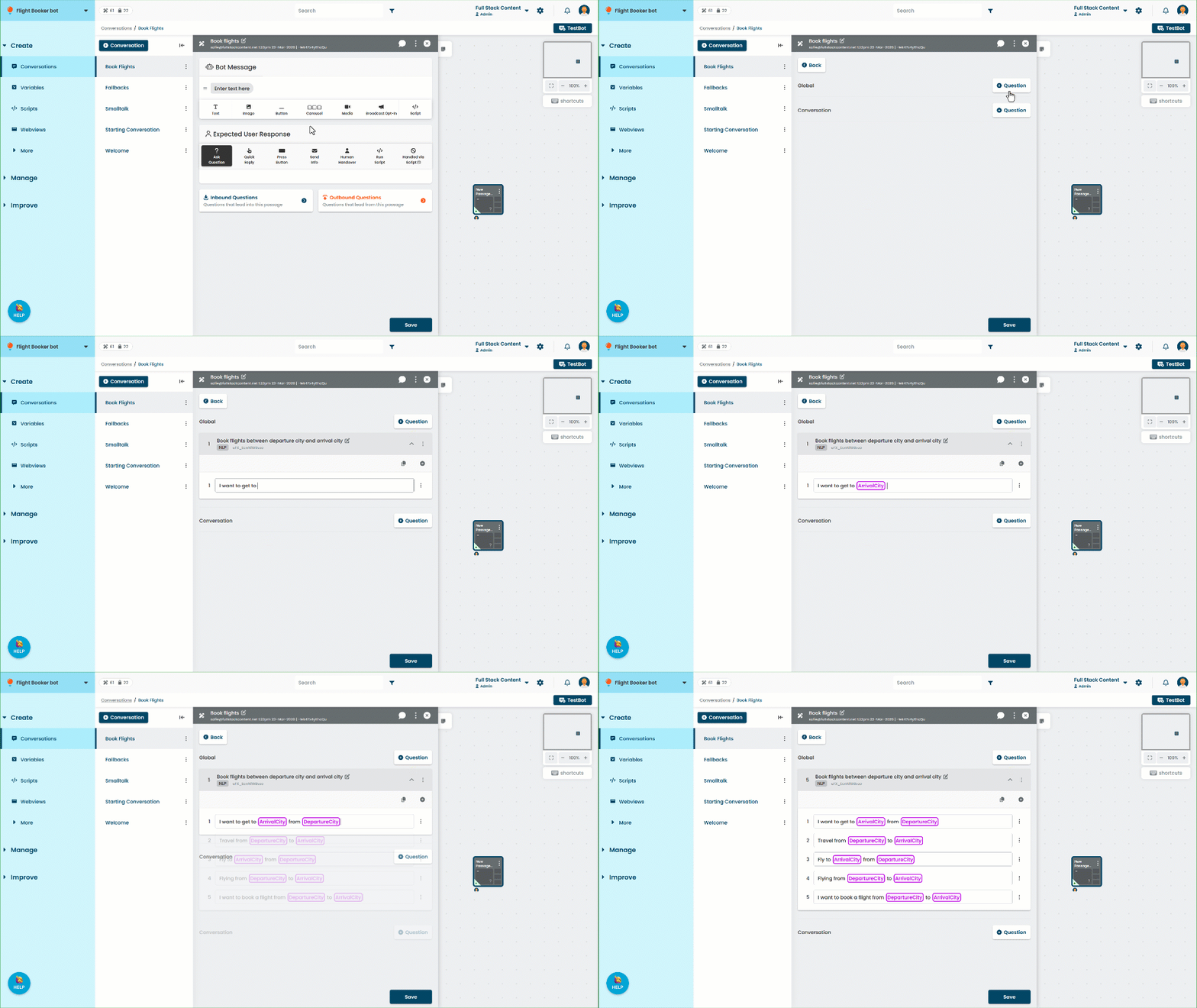
Let's create an inbound question to capture the two cities:
- Click Create in the left navigation, then click Conversations.
- Click the book flights conversation, then click the flight booking passage.
- Click Inbound Questions.
- Add a new Global question.
- Type a training phrase.
When you want to use the entity in the phrase, type @ and select the entity from the list.
Each entity can only be used once per training phrase. - Add more training phrases until you have at least five.
Make sure all your training phrases use both entities. If you use the Generate Training Phrases option, make sure you edit each phrase to use the entities. - Click Save.
Make sure all training phrases use the entities
Entities are assigned by the matching training phrase. If the training phrase that best matches doesn't use an entity, then the chatbot won't capture the information. The passage will still be selected, but there won't be any value in the entity, and the entity placeholder will be blank.
This also happens if the chatbot starts the passage without matching the question, such as being directed by a Quick Reply in another passage, or if the words the user used don't match any of the entity's values.
To capture the cities and use them in our response, we need to make sure every training phrase in the inbound questions for this passage uses both entities, and that there is no other way the chatbot can start this passage.
Now that we've captured values for our entities, let's use them in our chatbot response.